A computerized sewing machine is worth paying more for only when its electronic controls solve tasks you repeat often. Stitch count and screen size are weak shortcuts because machines with very different totals can still offer a similar set of everyday controls. Compare stitch selection, length and width adjustment, speed limiting, needle stop position, Start/Stop behavior, workspace, included essentials, warranty, and support. The goal is to identify which electronic functions will change your workflow and which will sit unused.
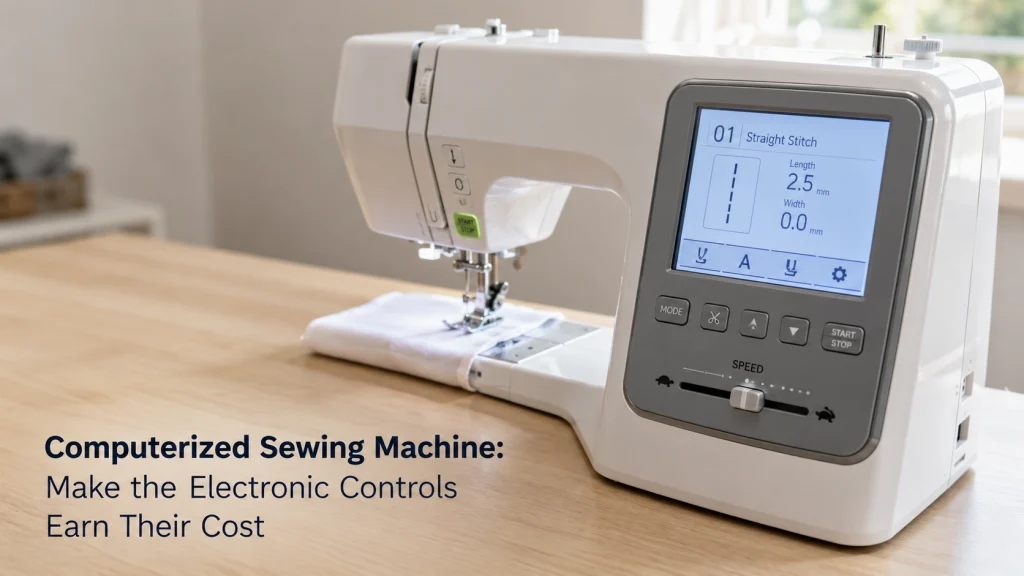
The stitch-count winner can lose the workflow test
A computerized sewing machine can make repeated setup and handling decisions faster, but a larger stitch library does not automatically make the machine more useful. If one machine gives you the controls you will use every session and another mainly adds decorative patterns you rarely need, the smaller feature list may be the better fit. That is why the buying test should begin with your five most repeated sewing operations, not the biggest number printed on the box.
The scope is limited to general-purpose domestic computerized machines for home sewists and small makers. Sewing-embroidery combinations, material-specific rankings, budget-only choices, and machines selected mainly for frequent transport belong elsewhere. If you are still choosing between control families, start with the mechanical versus computerized machine comparison before narrowing candidates.
Confirm which electronic functions you will use repeatedly
Write down the actions that interrupt your sewing most often. A garment sewist may care about slowing the machine for short curves, stopping with the needle down before pivoting, changing stitch width quickly, and making consistent buttonholes. Someone doing long utility seams may care more about a predictable speed ceiling, a clear display, and easy return to a familiar straight stitch. These are concrete tasks that can be matched to controls.
The best computerized sewing machine for a given buyer is not necessarily the one with the longest feature list. A feature earns its cost when it removes a repeated adjustment, reduces a common setup mistake, or gives useful control while you manage fabric. Features that do not map to normal work should remain optional.
| Repeated task | Control to verify | What to check on the exact machine |
|---|---|---|
| Sewing slowly through a curve or bulky intersection | Speed slider or maximum-speed control | Whether it limits top speed during normal sewing and how it interacts with the foot controller |
| Pivoting at corners | Needle up/down or needle stop position | Whether the machine can be set to stop with the needle in the fabric |
| Repeating common utility stitches | Direct selection or clear stitch navigation | How many steps are needed to reach the stitch and change its settings |
| Finishing seam ends | Reverse, reinforcement, or tie-off control | What the button actually does for the selected stitch |
| Sewing without the pedal | Start/Stop button | Whether it works with the foot controller connected and what restrictions the manual states |
That last column matters because the same label can hide different behavior. A Start/Stop button, for example, may be unavailable while a foot controller is connected on some machines. Read the exact manual before assuming the control works the way another computerized model does.

The Brother XM2701 includes 27 built-in stitches, an auto-size buttonhole, and an automatic needle threader. Six included sewing feet support common everyday sewing tasks. Its free arm helps with cuffs, sleeves, and pant legs.
Check On AmazonIf you click this link and buy, we earn a commission at no additional cost to you.
Normalize utility stitches, decorative stitches, alphabets, and buttonholes
Stitch totals are difficult to compare until you separate what is being counted. One machine may devote much of its total to decorative patterns or lettering, while another may have a smaller overall number but still cover the utility stitches you use for seams, stretch fabrics, edge finishing, blind hems, and buttonholes. The total is not meaningless, but it should come after you identify the stitch categories that matter to your projects.
A first-time buyer may assume that twice as many listed stitches means twice as much everyday capability. It does not. Once the utility stitches and settings you need are covered, much of the remaining difference may be creative variety rather than broader core function.
| Stitch category | Why it may matter | How to compare it |
|---|---|---|
| Utility stitches | Construction, hems, seams, reinforcement, and common fabric handling | Confirm the specific utility stitches you expect to use, not just the category total |
| Stretch or overcasting stitches | Useful for selected fabrics and seam treatments | Check the stitch form, recommended foot, and adjustable settings |
| Buttonholes | Different styles can suit different garment or project needs | Compare the buttonhole types and the actual setup sequence |
| Decorative stitches | Useful when decorative stitching is part of your work | Count only the patterns you can realistically see yourself using |
| Alphabets | Useful for simple sewn lettering on machines that include it | Do not confuse sewn lettering with embroidery capability |
If lettering or decorative stitching is central to the purchase, inspect the actual stitch chart before buying. If it is not, keep the comparison focused on utility behavior and control access so a large decorative library does not distort the decision.

Brother XR9550 is a computerized sewing and quilting machine with 165 built-in stitches. Its stitch library includes 110 utility, decorative, and heirloom stitches, 55 alphanumeric stitches, and eight one-step auto-size buttonhole styles. The machine also includes a backlit LCD display, an advanced needle threading system, a Quick-Set drop-in bobbin, eight presser feet, a wide table, and a hard case.
Check On AmazonIf you click this link and buy, we earn a commission at no additional cost to you.
Audit the interface before the feature count
An electronic feature is useful only if you can reach and understand it without stopping to decode the machine every few minutes. Check how the machine identifies the selected stitch, whether the display shows length and width, how settings are changed, and whether recommended presser-foot information appears. The important question is not whether the machine has an LCD, but what useful information that screen gives you while you are sewing.
When reading computerized sewing machine recommendations, look for the control sequence rather than a repeated feature list. If two candidates both offer adjustable stitch width, compare the steps required, whether the current value stays visible, and how clearly the machine signals a return to default.
Stitch selection and screen feedback
Look for a selection method that fits the number of stitches you will actually use. Direct keys can be quick for a small set of common stitches, while a numbered system can work well when the stitch chart is clear and the screen confirms the selection. Do not assume a larger display is automatically easier. What matters is whether the information you need is visible at the point of use.
Length and width adjustment
Verify whether stitch length and width can be changed directly and whether the permitted range depends on the selected stitch. A computerized machine may provide recommended defaults when you choose a stitch, but those defaults are not a substitute for checking the material, needle, thread, and seam result in front of you. The useful control is one that makes an intentional adjustment easy and makes the current value clear.
Error information where documented
Some computerized machines can display an error when the machine state prevents sewing, such as an incompatible control condition or an incorrect setup step. Treat that as diagnostic information, not proof that the machine can diagnose every sewing problem. Error messages are model-specific, so use the manual to interpret the exact code instead of applying a code from another machine.
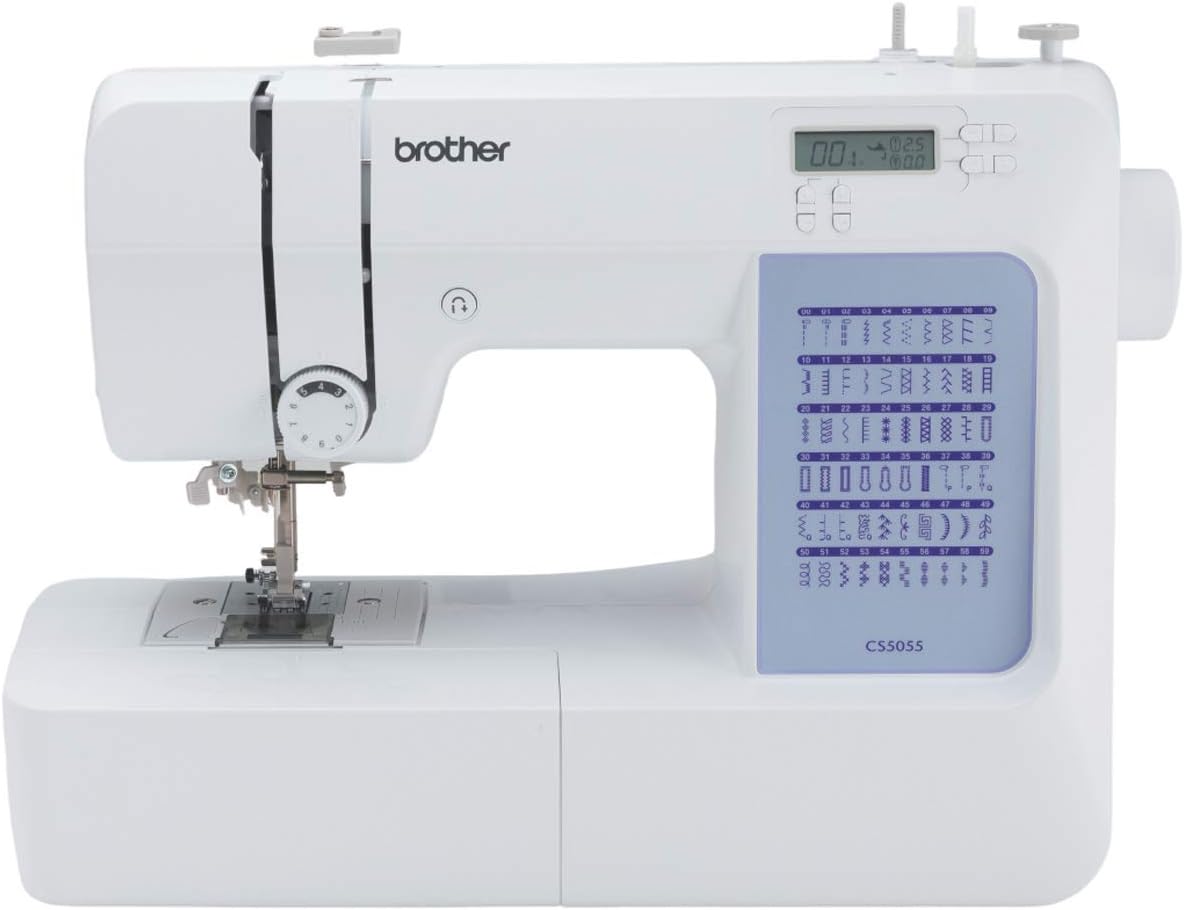
Brother CS5055 is a computerized sewing machine with 60 built-in stitches and seven one-step auto-size buttonholes. Its LCD display is used for computerized stitch selection, while the machine also includes an improved needle threading system and Quick-Set bobbin. The package includes seven presser feet for operations such as buttonholes, zippers, overcasting, blind stitching, and button sewing.
Check On AmazonIf you click this link and buy, we earn a commission at no additional cost to you.
Check controls that change handling
The most valuable electronic features often affect how the machine behaves while your hands are on the fabric. Speed limiting, needle stop position, Start/Stop control, reinforcement, and thread cutting where available can matter more than dozens of decorative stitches. When possible, audition these controls because button placement and control logic are hard to judge from photos.
Do not translate those controls into claims the evidence does not support. A computerized machine is not automatically more precise, quieter, more powerful, more durable, or easier to repair than a mechanical one. Those are separate questions that require model-specific testing, service information, or documentation.
Speed slider and low-speed start
A speed slider can be useful when you want a ceiling on how fast the machine can run, especially while learning a new operation or guiding a short curve. Check whether the slider limits speed with the foot controller, with Start/Stop operation, or both. Also check how the machine begins from rest, because a low maximum speed does not automatically prove that the first movement will feel smooth to you.
Start/Stop and foot-control restrictions
Start/Stop is valuable only if you understand its operating conditions. Manufacturer support documentation shows that on some computerized machines the Start/Stop button will not start normal sewing while the foot controller is connected. That is exactly the kind of small implementation detail that a specification checklist can miss, so verify the exact manual instead of assuming all electronic controls can be combined freely.
Needle up/down, tie-off, and thread cutting where present
Needle stop position can be useful for repeated pivots because you can choose whether the needle remains in the fabric when you stop. Reinforcement or tie-off controls can also reduce repeated hand movements, but their behavior may depend on the selected stitch. An automatic thread cutter is a separate feature and should not be assumed merely because a machine has computerized controls or a reinforcement button.

Brother HC1850 is a computerized sewing and quilting machine with 185 built-in stitches, including eight auto-size buttonhole styles. It features an LCD display, advanced needle threading system, and a jam-resistant drop-in top bobbin. The machine comes with eight sewing feet and a detachable wide table for sewing and quilting projects.
Check On AmazonIf you click this link and buy, we earn a commission at no additional cost to you.
Verify default and retained-setting behavior only from the exact manual
A computerized machine may load default length, width, needle position, or other values when a stitch is selected. What happens after you change those values, choose another stitch, or power the machine off is model-specific, so verify any behavior that matters to your routine.
A predictable reset can suit one sewist while retained settings suit another. Neither is universally better; what matters is knowing what the exact machine will do before you depend on it.
Note: Treat claims about memory, power-cycle behavior, defaults, or retained settings as unverified until the exact documentation confirms them.
Compare workspace, feed controls, and included essentials
Electronic controls are only one part of the machine. Check the physical sewing area, free-arm access, feed-dog control, presser-foot compatibility, bobbin system, lighting, and the accessories required for the work you actually plan to do. A convenient interface does not compensate for a machine that is awkward for your project size or missing an accessory you genuinely need.
Included feet should also be evaluated by use, not by quantity. If the machine includes a foot you would otherwise buy for a repeated operation, that has real value. A larger bundle is less meaningful when most of the feet are unrelated to your projects, and any optional foot still needs exact compatibility verification for the machine and attachment system.
- Confirm the usable sewing area for the projects you expect to handle.
- Check whether the feed dogs can be lowered if your work requires that function.
- Verify the bobbin class and approved replacement bobbins for the exact machine.
- List the presser feet you will use during the first few projects and check whether they are included.
- Confirm that the manual, accessory list, and support path are available before purchase.
These physical checks keep the electronics in context. A machine can have an excellent control panel and still be the wrong fit if its workspace, feed arrangement, bobbin system, or accessory support does not match the work you plan to do.

Brother CP100X is a computerized sewing and quilting machine with 100 built-in stitches and eight auto-size buttonholes. It includes a wide table, 10 sewing feet, a quilt guide, and a protective hard case. The machine also has a one-step automatic needle threader, Quick-Set bobbin system, metal frame, and fixed needle bar.
Check On AmazonIf you click this link and buy, we earn a commission at no additional cost to you.
Make portability the primary test when repeated transport matters most
If you expect to carry the machine frequently, transport needs should move ahead of electronic extras. Weight, case design, storage footprint, power setup, and how easily the machine can be packed may matter more than a larger stitch library.
In that situation, use the portable sewing machine buying criteria to frame the purchase around repeated movement and storage. A computerized model can still qualify, but portability should be tested as the primary requirement rather than treated as a bonus feature.

Janome 3160QDC-G is a computerized sewing and quilting machine with 60 built-in stitches and six one-step buttonholes. It includes a speed control slider, automatic thread cutter, built-in needle threader, and memorized needle up and down control. The machine weighs about 12.6 pounds and comes with an extension table and hard cover for sewing, storage, and transport.
Check On AmazonIf you click this link and buy, we earn a commission at no additional cost to you.
Verify warranty and support before purchase
A computerized machine adds electronic controls to a mechanical sewing system, so support matters beyond the feature comparison. Read the warranty terms rather than relying on the largest number in a product description. Check what is covered, what is excluded, who performs service, and how you obtain help.
Also confirm that the exact model has a downloadable manual, model-specific support information, and a realistic service route where you live. This is not evidence that the machine will fail. It is simply part of ownership planning, especially when two candidates are otherwise close and one has a much clearer documentation and support path.
Set exclusions and evidence thresholds
Remove any candidate that fails a requirement you have already identified. If you need a speed limiter, do not let a larger stitch count compensate for its absence. If you need a specific presser-foot interface or a documented control behavior, do not assume visual similarity or retailer wording is enough proof.
Keep performance claims separate from documented specifications. A manufacturer page can verify a speed slider, needle-position key, or Start/Stop button, but it cannot prove that the machine feels intuitive, starts more smoothly, sews more precisely, lasts longer, or costs less to repair.
| Claim | Acceptable evidence | How to score it |
|---|---|---|
| Control exists | Exact manufacturer page or manual | Verified |
| Control has a restriction | Exact manual or model-specific support page | Verified when the restriction matches the candidate |
| Interface feels intuitive | Your documented trial or a disclosed independent test | Untested until observed |
| Low-speed start feels smooth | Documented trial with the exact machine and setup | Untested until observed |
| More reliable or cheaper to repair | Relevant service or reliability evidence, not a feature page | Do not score without evidence |
This verified-versus-untested ledger keeps a shortlist from turning into a collection of assumptions. It also makes it easier to compare machines from different brands without giving extra weight to whichever product page uses the strongest marketing language.
Build the computerized shortlist by required workflow
Current machines show why stitch count needs context. The PFAFF smarter 260c lists 27 stitches but also documents direct stitch selection, a speed slider, Start/Stop, needle up/down, tie-off, and automatic stitch length and width defaults. Brother’s CP2160F lists 60 stitches, seven one-step buttonhole styles, an LCD, Shift Key stitch selection, drop feed, and seven included feet. The Brother CS7205 lists 205 stitches, including 55 alphanumeric stitches and eight one-step buttonhole styles, plus variable speed control, Start/Stop, needle stop up/down, built-in memory, and 11 included feet.
Those examples are not ranked recommendations. They show three different ways a computerized control set can be packaged, and they make the workflow test concrete: a lower stitch total can still expose the exact handling controls a buyer values, while a larger library may add categories that matter only to certain projects.
| Current model example | Verified control or stitch evidence | Question to ask before keeping it |
|---|---|---|
| PFAFF smarter 260c | 27 stitches, direct selection, speed slider, Start/Stop, needle up/down, tie-off | Do these handling controls matter more to you than a larger stitch library? |
| Brother CP2160F | 60 stitches, seven one-step buttonholes, LCD, Shift Key selection, drop feed | Does its documented control set cover your repeated tasks before you add optional features? |
| Brother CS7205 | 205 stitches, 55 alphanumeric stitches, eight buttonholes, variable speed control, Start/Stop, needle stop up/down | Will you use the larger stitch inventory as well as the handling controls? |
After that comparison, label each requirement as required, useful, optional, or unused. Reject a candidate that misses a required control, and do not let optional stitch capacity compensate for the gap.
Identify electronic functions you will pay for but not use
Decorative stitches, alphabets, extra buttonhole styles, programmed sequences, and bundled accessories should receive credit only when they solve a task you expect to perform. Extras are not bad; they simply should not outweigh controls tied to repeated work.
Write “I will use this when I…” beside each premium feature. If you cannot finish the sentence with a realistic sewing operation, mark that feature optional.
Build a control audition for each finalist
If you can try a finalist, test the controls already on your required list using the same fabric, appropriate needle, thread, and short sequence on each machine. If you cannot test in person, use the exact manual to verify control steps and mark feel, low-speed behavior, and ease of use as untested.
| Audition step | What to record |
|---|---|
| Select your normal straight stitch | Number of actions and clarity of screen feedback |
| Change stitch length and width | How the value is displayed and how easy it is to reverse the change |
| Set a low speed ceiling | Control range and behavior with your preferred operating method |
| Stop with needle down | Whether the setting behaves as expected during repeated stops |
| Use Start/Stop if relevant | Any foot-controller restriction or setup requirement |
| Return to a common stitch | Whether defaults or previous settings appear and whether that matches the manual |
The audition is not a durability test and should not be treated as one. It is a focused way to learn whether the electronic controls you are paying for actually make your normal sequence easier to manage.
Return to mechanical when the desired workflow does not need electronic control
If your required list ends up being straight stitch, zigzag, a buttonhole option, basic length adjustment, and a few familiar mechanical controls, you may not need computerized operation at all. Electronic controls are not a mandatory upgrade path. They are useful when they solve a control or workflow problem you actually have.
That is a good point to compare the cost and ownership tradeoffs again. The mechanical sewing machine decision criteria can help you check whether simpler controls already cover your work, while the broader sewing machine buying framework can bring project fit, support, workspace, accessories, and ownership cost back into the final decision.
Final Thoughts: Buy the controls, not the display or stitch total
A computerized machine earns its place when the electronic controls match work you repeat often. Start with your tasks, verify the exact implementation in the manual, separate documented features from untested claims, and give no extra credit to decorative capacity you are unlikely to use. That process usually produces a smaller and more defensible shortlist than comparing headline numbers.
If the useful electronic functions are speed control, needle stop position, clearer stitch selection, or another specific control, make those features carry the decision. If you cannot identify a repeated task that needs computerized control, a simpler machine may still be the better purchase. The important result is not owning more electronics; it is having the right controls for the way you actually sew.
Frequently Asked Questions
💻 Is a computerized sewing machine better than a mechanical one?
Not automatically. A computerized machine is a better fit when its electronic controls solve tasks you repeat often; a mechanical machine may be the better choice when simpler controls already cover your work.
🧵 How many stitches do I actually need on a computerized machine?
There is no useful universal number. Confirm the utility stitches, buttonholes, stretch or overcasting options, and decorative stitches you will actually use, then treat the rest as optional capacity.
🎚️ Is a speed slider worth paying for?
It can be valuable if you regularly want to limit top speed while learning, guiding curves, or handling short controlled sections. Verify how the slider works with the foot controller and Start/Stop operation on the exact model.
🪡 What does needle up/down do?
It lets you control the needle’s stopping position on machines that provide the feature. Stopping with the needle in the fabric can be useful for repeated pivots, but the exact behavior should be checked in the machine manual.
🦶 Can I use the Start/Stop button with the foot controller connected?
Do not assume so. Some machines disable Start/Stop for normal sewing while the foot controller is connected, so check the exact manual or model-specific support documentation.
✂️ Do all computerized sewing machines have an automatic thread cutter?
No. Thread cutting is a separate feature and should be verified on the exact machine rather than inferred from the presence of a screen or electronic controls.
References and Sources
- PFAFF smarter 260c specifications: Verifies the 27-stitch inventory, direct stitch selection, speed slider, Start/Stop, needle up/down, tie-off, and manual thread cutter.
- Brother CP2160F specifications: Verifies the 60-stitch inventory, seven one-step buttonholes, LCD, Shift Key selection, drop feed, and included feet.
- Brother CS7205 specifications: Verifies the 205-stitch inventory, alphanumeric stitches, buttonholes, variable speed control, Start/Stop, needle stop control, memory, and included feet.
- Brother Start/Stop restriction: Confirms that listed models can block Start/Stop operation while the foot controller is connected.