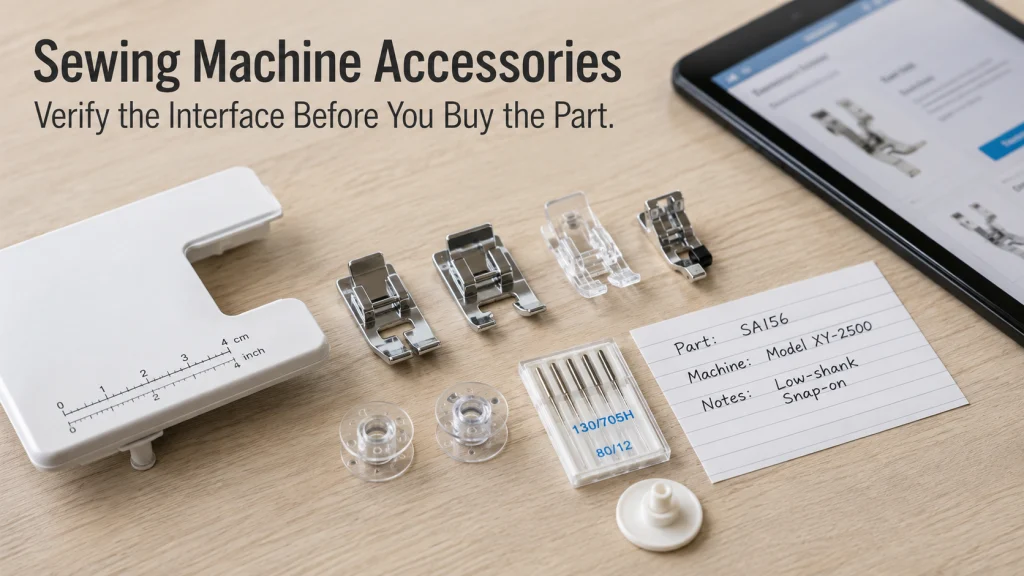
Sewing machine accessories are compatible only when the part and the machine share the interface the manufacturer actually specifies. A familiar accessory name, a matching brand, or a part that looks identical is not enough evidence, because part numbers, model lists, needle systems, mounting geometry, and electrical requirements can change across machine families. The safest buying workflow is to identify the exact machine first, classify the component by the interface that must match, and then verify the part against current manufacturer documentation. This approach also makes it easier to know when you are shopping for a part and when the real problem belongs in troubleshooting instead.
The same accessory name can point to different parts
A search for sewing machine accessories can make compatibility look simpler than it is. JUKI currently lists multiple items called “Standard Presser Foot,” but the entries carry different part numbers and applicable-model lists. Part 40245085 and part 40057923 do not point to the same machine group. The generic name describes the job, not the proof of fit.
The same brand can also impose different limits across models. JUKI marks twin-needle sewing as supported on the HZL-F600 and unavailable on the HZL-K65, while its twin-needle accessory page has its own part number and model list. That is enough to show why the category name alone cannot settle compatibility.
- Identify the exact machine model and US documentation.
- Name the interface that must match.
- Find the manufacturer part number or specification.
- Confirm the applicable-model list and any adapter or limit.
- Stop if fit, electrical rating, or service status is still unclear.
Use those five checks before comparing price, package size, or seller claims.
Identify the exact machine before searching for an accessory
Start with the model number on the machine, not with a retailer description such as “low shank machine,” “standard bobbin,” or “universal sewing machine.” Those phrases can be useful search clues, but they are not a substitute for the exact model identity. A one-letter or one-number difference can place a machine in a different family with different included parts, control connections, plates, or accessory support.
Confirm the market when it matters because manuals, electrical components, package contents, or naming can vary by region. If a used machine has a damaged label, record every reliable identifier you can find instead of guessing from appearance.
| Exact-machine record | What to write down | Why it matters |
|---|---|---|
| Brand and full model | Every letter, number, suffix, and series mark | Controls the manual and applicable-model list |
| Market or region | US model or other known market designation | Can affect electrical parts and documentation |
| Manual or support page | Current manufacturer source for the exact model | Establishes approved parts, setup limits, and service boundaries |
| Existing part | Part number, dimensions, connector, mount, or marking when available | Provides another verification point without relying on appearance |
Keep this record beside the browser tab while shopping. It turns a vague search for sewing machine parts and accessories into a model-specific verification task.
Record the model number, market, and documentation source
The manual is often the fastest place to learn which part descriptions the manufacturer uses. Look for sections covering included accessories, optional accessories, needles, bobbins, presser feet, foot controls, power connections, maintenance items, and replacement instructions. When the manual gives a part number or exact specification, copy it exactly rather than translating it into a generic shopping term.
Then check the manufacturer’s current support or accessory page because a web listing may contain a newer model list or superseded part number. If the manual and current page appear to disagree, do not pick whichever answer is more convenient. Record the discrepancy and contact manufacturer support or an authorized service source before buying a part whose fit or electrical rating cannot be established.
Separate included, optional, and replacement components
Not every accessory search is the same buying problem. An included component is something that originally shipped with the machine. An optional component adds a supported function. A replacement component restores a part the machine already requires, such as a foot control, spool pin, bobbin case, plate, belt, or machine light that the manufacturer allows the owner to replace.
This distinction matters because the evidence path changes. An optional extension table may be verified by an accessory catalog and model list, while a replacement power cord may require exact electrical and connector information from the manual or official parts support. Treating both as “sewing machine attachments” can hide the very specification that controls whether the purchase is correct.
- Included: confirm the original package list and exact component description.
- Optional: confirm the accessory part number, supported models, and any operating limits.
- Replacement: confirm both the part identity and whether owner replacement is permitted.
Once the component type is clear, classify the interface. That is where compatibility stops being a naming problem and becomes something you can actually verify.

The Brother SA160 is a genuine optional stitch guide foot for compatible Brother sewing machines. It has an incrementally marked ruler and a horizontal opening that accommodates a range of needle positions. Brother publishes a model-specific For Use With list, so confirm that your exact machine appears on that list before ordering.
Check On AmazonIf you click this link and buy, we earn a commission at no additional cost to you.
Classify the accessory by the interface that must match
Different accessory families fail for different reasons. A needle must match a needle system and fit the machine’s clearance limits. A bobbin must match the lower-thread system. A presser foot may depend on holder geometry, shank arrangement, attachment method, stitch width, and needle clearance. Electrical parts add another layer because a connector that physically enters a socket is not proof of correct electrical compatibility.
The practical question is therefore not “Does this accessory look right?” It is “Which interface controls this accessory, and what manufacturer evidence proves that interface matches my exact machine?” The routing table below keeps those checks separate.
| Accessory family | Interface to verify | Primary evidence |
|---|---|---|
| Needles and special needles | Needle system, size range, point/use limits, needle-area clearance | Exact manual and manufacturer needle guidance |
| Bobbins and bobbin cases | Bobbin class, dimensions, material, case, hook system | Manual, parts list, manufacturer compatibility page |
| Presser feet and attachments | Holder, shank, attachment, needle opening, stitch-width limit | Accessory part number and applicable-model list |
| Plates, guides, and tables | Bed geometry, mounting points, feed-dog and needle openings | Manufacturer model list and installation documentation |
| Spool and winding parts | Pin diameter, cap arrangement, mounting point, winder interface | Manual and official accessory or parts documentation |
| Controls, cords, belts, and lights | Connector, electrical rating, belt dimensions, lamp specification, service status | Exact manufacturer documentation |
These families overlap in purpose but not in proof, so verify the interface that actually controls each purchase.
Needle system and special-needle clearance
A normal household needle and a special needle can share a familiar shape while still raising different compatibility questions. Verify the needle system specified in the manual first, then check whether the machine permits the special configuration you intend to use. Twin needles are a clear example: the machine must have enough needle-area clearance and the manufacturer must permit the configuration for that model and stitch setup.
Bobbin class, material, case, and hook-system fit
Bobbins need a lower-system match, not a category-name match. JUKI’s current documentation lists different bobbin part numbers for different machine groups and tells owners to use the bobbin designed for the machine. Record the specified bobbin identity together with the case and hook-system context before buying replacements.
Presser-foot holder, shank, attachment, and stitch-width limits
A presser foot has to attach correctly and leave the needle a safe path through every permitted position used by the selected stitch. Some feet snap onto a holder, some replace the holder, and some depend on a particular attachment system. If an adapter is required, that adapter becomes part of the compatibility chain rather than a magic way to make every foot fit.
Needle plate, feed-dog, seam-guide, and extension-table geometry
Machine-bed accessories depend on physical geometry. A plate must align with the machine’s mounting points, feed dogs, needle positions, and any sensors or release system the model uses. An extension table must fit the machine bed and support points. Similar overall width is not enough if the locking tabs or bed contour differ.
Spool-pin, cap, stand, and bobbin-winder interfaces
Spool support parts look simple, which makes them easy to buy casually. A replacement spool pin still needs the correct mounting method, and a spool cap needs to work with the machine’s pin arrangement and intended spool orientation. Portable bobbin winders are a separate device decision, so verify what they are designed to wind rather than assuming every machine bobbin belongs on every winder.
Foot-controller, cord, belt, light, and replacement-part fit
Electrical and drive components require the strictest boundary. Match the exact manufacturer specification for the model, including the correct controller or cord identity and any stated electrical rating. Do not substitute a cord or pedal because the plug appears to fit, and do not work on exposed powered mechanisms. Belts and user-replaceable lights also need the correct size or specification and the service boundary stated for the machine.

This pack contains four transparent plastic SINGER Class 15 bobbins for compatible sewing machines. SINGER lists Class 15 compatibility across selected machines from several brands, but the machine manual should still be checked for the required bobbin size. These are Class 15 bobbins, so they should not be substituted when a machine specifies a different bobbin class.
Check On AmazonIf you click this link and buy, we earn a commission at no additional cost to you.
Treat part numbers and model lists as primary compatibility evidence
A strong compatibility check builds from the most specific evidence outward. The exact machine manual and current manufacturer part or accessory page come first. A manufacturer compatibility tool or parts list can add confirmation. Retailer descriptions can help locate a candidate part, but they should not override the manufacturer when the listing uses broader terms than the official documentation.
Janome accessory pages pair a manufacturer part number with compatible models. Brother uses the same evidence pattern on accessory pages such as SA160, where a “For Use With” list names supported machines. The useful detail is not the brand itself, but the exact model-level statement attached to the part.
How to read a compatibility page: Find the accessory part number first, then search the page for the exact machine model. Note any required holder, adapter, stitch-width limit, regional restriction, or replacement note. If the page offers only a broad family label, confirm the exact model through the manual or manufacturer support before treating the part as verified.
| Evidence level | What it can establish | What it cannot establish by itself |
|---|---|---|
| Exact model manual | Approved systems, settings, included items, owner-service boundaries | Whether every currently sold third-party listing is accurate |
| Manufacturer part page or compatibility list | Part number and stated applicable models | Performance outside the documented use |
| Manufacturer support confirmation | Clarification when documentation is incomplete or revised | A universal rule for unrelated models |
| Retailer listing | What the seller claims and what package is being offered | Technical fit when the exact model is not documented |
| Community report | A real question, confusion, or anecdotal fit problem | Authoritative compatibility, electrical safety, or dimensions |
Keep the exact source with the part number in your record. If a listing changes later, you still know which evidence supported the decision at the time.
Build a part-number and applicable-model ledger before checkout
A simple ledger prevents the common mistake of remembering only the accessory name. Record the machine, the proposed part number, where that number came from, the applicable models stated by the manufacturer, and any condition that limits use. For a presser foot, that condition might be needle position or stitch width. For a power component, it may be a connector and electrical specification.
A small note is enough as long as every field is tied to evidence rather than memory or appearance.
| Ledger field | Example of what belongs here |
|---|---|
| Owned machine | Exact full model from the machine label |
| Accessory family | Presser foot, bobbin, plate, controller, or other interface family |
| Manufacturer part number | Exact number from the current official source |
| Applicable-model evidence | Exact model list, manual statement, or support confirmation |
| Limits or unknowns | Stitch, clearance, electrical, mounting, or service condition still to verify |
If one field remains unknown, that is useful information. It tells you what to resolve before buying instead of discovering the gap after the package arrives.
Treat visual similarity and universal wording as claims to verify
“Universal,” “standard,” and “fits most” can be useful commercial shorthand, but none is a complete compatibility definition. A seller may mean that an item fits a broad group of low-shank machines, a particular bobbin family, or a range of machines when used with an adapter. The boundaries have to be stated somewhere before the claim becomes useful for your machine.
A product photo can confirm general shape, but it cannot establish holder geometry, lower-system requirements, needle clearance, or an electrical specification. Use the photo to identify a candidate, then return to the manufacturer evidence.
- Reject a universal claim that does not define the compatible machine group or interface.
- Reject fit based only on a photo, color, approximate dimension, or matching brand badge.
- Confirm the exact model appears in the manufacturer evidence when a model list is available.
- Confirm adapters, holders, or mounting parts required to complete the interface.
- For electrical parts, verify the exact manufacturer specification rather than testing an uncertain substitute.
This checklist does not make third-party parts automatically wrong. It moves the burden of proof back to the interface that must match. Brother’s sewing support says third-party accessories are untested and may cause damage, but it does not say every third-party accessory voids a warranty. Check the exact machine warranty separately when coverage could affect the purchase.
For needles, start with the machine’s specified needle system
Needle compatibility starts with the system named for the machine, then narrows by fabric, thread, point style, and size. Special configurations add clearance questions, so the exact manual controls what the machine permits.
For the detailed selection path, use the section on matching sewing machine needles correctly. That is where needle system, size, special-needle support, and the material-thread relationship belong once the machine itself is identified.

These SCHMETZ Universal sewing machine needles are size 80/12 and use the 130/705 H household needle system. The Amazon pack contains 20 needles arranged as two cards, while SCHMETZ describes its Universal type as having a slightly rounded point for woven and knit fabrics. Confirm that your machine specifies the 130/705 H system and that size 80/12 suits the intended material and thread before use.
Check On AmazonIf you click this link and buy, we earn a commission at no additional cost to you.
For bobbins and bobbin cases, verify the lower-thread system
Match bobbins to the lower-thread system the machine was designed to use. The bobbin case and hook arrangement also matter when the purchase goes beyond a simple refill. A wrong lower-system part can create a fit problem that looks like a sewing problem.
The deeper compatibility path is covered in verifying sewing machine bobbins and cases. Use it when the unresolved question is class, dimensions, material, case identity, or hook-system fit.
For presser feet, verify the holder and attachment system
The generic foot name tells you the task, but the mount controls fit. Check the holder, shank arrangement, attachment method, needle opening, stitch width, and any required adapter. Physical attachment alone does not prove safe needle clearance.
When the purchase centers on a foot or attachment, continue with checking presser foot compatibility by interface. That separates snap-on feet, holder changes, adapters, and model-specific limits without assuming the task name proves fit.
For plates, guides, and extension tables, verify machine-bed geometry
A needle plate’s openings and mounting points must match the machine precisely. Machine-mounted guides and extension tables also depend on bed geometry, attachment points, and clearance. Approximate fit is not enough around a moving needle or feed mechanism.
For those components, use the compatibility checks for needle plates and machine-bed accessories. Installation technique comes later, after the exact component has already been verified for the machine.
For spool and winding parts, verify how the thread is supported
Spool pins, caps, stands, and winding parts can look generic, but fit still depends on pin diameter, mounting point, spool orientation, and machine layout. A replacement pin that cannot lock into the intended mount is not a match.
Use the section on matching spool pins and winding accessories when the decision concerns thread support or compatible winding hardware. Keep the machine’s own threading and bobbin-winding instructions beside that compatibility check.
For controls, cords, belts, and lights, verify the exact replacement specification
Controls, cords, belts, and lights need a stricter stop rule because some carry power or affect machine drive. Use exact model documentation to identify the permitted replacement. Do not energize an uncertain substitute or open service-only areas to identify a part.
For that purchase path, continue to verify sewing machine replacement parts. If the manual reserves the work for service personnel, compatibility research does not turn it into an owner repair.
Stop shopping when the starting question is why the machine failed
Compatibility research assumes you already know which component you need. If the real starting point is skipped stitches, fabric that will not feed, repeated jams, a hard needle strike, no power, abnormal motion, overheating, smoke, a burning odor, or another unexplained failure, buying a replacement part first can send you down the wrong path. The fault may come from setup, threading, a needle or thread mismatch, damage, or a service issue rather than the component you suspect.
Move to symptom-led troubleshooting before ordering anything when the failed part has not been identified. Damaged cords, exposed wiring, sparks, smoke, overheating, uncontrolled motion, hard mechanical lock, and repeated hard needle strikes are stop conditions for qualified service rather than experiments with substitute parts.
| Starting point | Where the question belongs |
|---|---|
| You know the component and need to prove it fits | Stay with compatibility verification. |
| You already have a verified compatible component and need to install or use it | Move to normal setup and use instructions for the exact machine. |
| You have a symptom but do not know which part failed | Move to troubleshooting before shopping. |
Choosing or replacing a known component belongs here; figuring out why the machine stopped working does not.
See more by accessory family
Once you know which interface controls the purchase, move into the matching component family rather than restarting a broad accessory search. Each path below keeps one type of compatibility evidence in focus.
If a listing mixes several components in one package, verify each interface separately rather than assuming the whole bundle fits.
| Component family | Continue with |
|---|---|
| Needles and special needles | Needle system and fit checks |
| Bobbins and bobbin cases | Bobbin and lower-system fit |
| Presser feet and attachments | Presser foot interface checks |
| Plates, guides, and tables | Machine-bed component compatibility |
| Spool and winding parts | Spool support and winding fit |
| Controls, cords, belts, and lights | Replacement part verification |
The goal is not to collect more accessories. It is to arrive at one supported part identity for the exact machine in front of you.
Final Thoughts: prove the interface before buying the accessory
A compatible accessory has an evidence chain: exact machine, correct component family, matching interface, manufacturer part or specification, and a model list or manual statement that supports the fit. The more a purchase depends on needle clearance, lower-system geometry, machine-bed geometry, or electricity, the less room there is for guessing from a photo or a broad “universal” label.
Write down the unknowns before checkout. If the part number, applicable model, connector, dimension, needle system, or service boundary cannot be verified, resolve that point first. The cheapest accessory is not a bargain when the evidence never established that it belonged on the machine.
Frequently Asked Questions
🧩 How do I know if an accessory fits my sewing machine?
Start with the exact model number, then check the manual and current manufacturer accessory or parts documentation. Match the part number, applicable-model list, and the interface that matters for that component.
🦶 Does a low-shank label mean every low-shank presser foot will fit?
No. Shank description is only one part of the fit check. Holder design, attachment method, needle opening, stitch width, and any required adapter still need to match the exact machine and intended stitch.
🧵 Can I use any bobbin that looks the same size?
Do not rely on appearance. Verify the bobbin type or part number specified for the model, including any material or lower-system requirement stated by the manufacturer.
⚡ Can I try a foot controller or power cord if the plug fits?
No. Physical connector fit does not establish electrical compatibility. Use the exact manufacturer specification for the machine and stop if the required electrical information cannot be verified.
🪡 Why can one machine use a twin needle while another cannot?
Twin-needle use depends on the machine’s needle-area clearance, threading arrangement, supported settings, and manufacturer approval. Check the exact model manual rather than assuming a feature carries across a brand family.
🔧 Should I buy a replacement part when the machine starts malfunctioning?
Only after the failed component has been identified. If you are starting from a symptom rather than a known part, troubleshoot first and use qualified service for electrical hazards, overheating, smoke, uncontrolled motion, hard lockups, or service-only work.
References and Sources
- JUKI home accessory catalog: Shows current accessory families and links to model-specific accessory details.
- JUKI standard presser foot listings: Verifies that the same accessory name can carry different part numbers and applicable-model lists.
- JUKI twin needle listing: Verifies part number 40083061 and the models currently listed for that twin needle.
- JUKI HZL-F600 specifications: Verifies current twin-needle support and included accessory information for that model.
- JUKI HZL-K65 specifications: Verifies that twin-needle sewing is marked unavailable for that model.
- JUKI bobbin listings: Verifies different bobbin part numbers and the manufacturer’s model-specific fit warning.
- Janome accessory compatibility example: Shows a part number and compatible-model list.
- Brother SA160 compatibility page: Shows an accessory part number with a model-specific “For Use With” list.
- Brother third-party accessory guidance: Supports the caution that untested third-party accessories may damage a machine.