Sewing machine troubleshooting works better when you identify the symptom family before changing settings, parts, or technique. A machine that will not feed fabric, forms loops underneath, locks at the handwheel, or has no power may need four completely different next steps even when the owner describes all four as “not sewing right.” Record the exact model and symptom, return only documented normal user states, change one safe variable at a time, and stop when the problem crosses into service-level work. This approach helps you decide whether the next move is a normal adjustment, cleaning, a verified compatible part, professional service, or a repair-versus-replace decision.
The same complaint can hide four different fault families
A useful sewing machine troubleshooting process starts with what the machine is actually doing, not with the fix that worked on somebody else’s machine. Picture four machines on four sewing tables. One leaves the fabric in place while the needle cycles, one produces loose loops under the fabric, one has a handwheel that will not turn normally, and one does not power on at all. Calling all four cases “the machine won’t sew” throws away the most useful evidence before diagnosis has even started.
Current manufacturer support follows the same basic logic. Brother separates fabric-feed problems from irregular stitches and no-power conditions, while SINGER’s current troubleshooting material separates feed problems, underside looping, skipped stitches, thread breakage, and needle problems. The exact checks still depend on the model, but the important starting principle is consistent: describe the symptom narrowly enough that you can choose the right diagnostic path.
Key point: Do not begin by adjusting tension, buying a part, oiling the machine, or removing covers. Begin by identifying the machine and writing down one reproducible symptom.
Quick self-check: Before reading further, answer these questions with the machine in front of you. Does the fabric fail to move even though the needle cycles? Is the fabric moving but the stitch itself looks wrong? Does the handwheel or mechanism feel jammed, unusually resistant, noisy, or unstable? Is the machine failing to power on or respond to normal controls? Or is the main question about cleaning, oiling, storage, or overdue service rather than a sudden malfunction? Your first clear “yes” identifies the symptom family to investigate next. If more than one answer is yes, start with any mechanical or electrical stop condition before testing sewing results.
Record the exact machine and exact symptom before changing anything
The model number matters because controls that look similar can have different normal states. One machine may have a drop-feed control, another may use a darning plate, and a computerized model may prevent sewing because a control state or mode is active. Even support pages that cover several models usually tell the reader to consult the exact manual because not every listed cause applies to every machine.
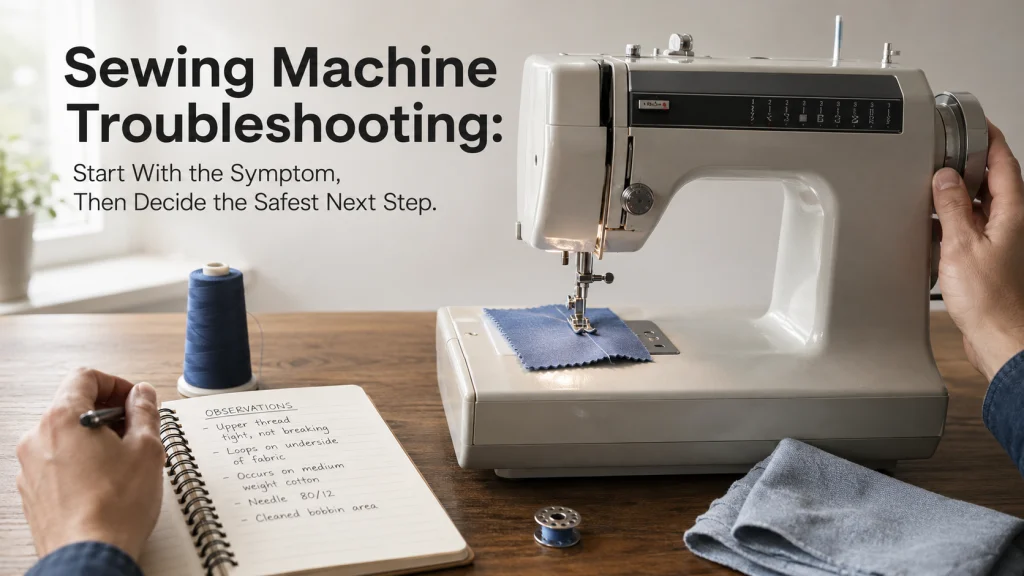
Write the symptom as an observation rather than a diagnosis. “Fabric does not advance when I select a normal straight stitch on two layers of woven cotton” is useful. “Feed dogs are broken” is not, because it turns a possible cause into a conclusion before the feed state, stitch length, presser-foot state, material, and model instructions have been checked.
| Evidence to record | Useful detail | Avoid assuming |
|---|---|---|
| Machine identity | Brand, exact model number, market, and manual or support page used | Instructions for a similar-looking model are identical |
| Selected operation | Stitch, length and width where applicable, control mode, presser foot, and feed state | A default-looking control is in its normal sewing position |
| Material setup | Fabric type, number of layers, stabilizer if relevant, needle, and thread | The project material is unrelated to the symptom |
| Observed symptom | What moves, what does not, where loops appear, any displayed message, and when the problem begins | The visible symptom identifies the failed internal part |
| Recent change | Needle change, bobbin change, threading, cleaning, transported machine, jam, accessory change, or long storage | The latest change caused the problem without verification |
This model-and-symptom worksheet becomes especially valuable if the machine eventually goes to service. A precise description, a sample of the failed stitching when safe to produce, and a record of the user-level checks already completed are more useful than a long list of adjustments made from memory.
Separate no-feed, bad-stitch, mechanical-motion, electrical-control, and maintenance symptoms
A broad sewing machine troubleshooting guide can easily become a wall of unrelated fixes. A better first pass is to place the problem into one fault family. That narrows what evidence matters next and prevents a stitch-formation problem from sending you into the power system, or a no-power condition from sending you into tension adjustments.
| Symptom family | What you observe | Next diagnostic route |
|---|---|---|
| Fabric feed and stitch length | Fabric does not advance normally, stitches are unexpectedly tiny or long, or material handling changes at a seam | Verify the documented feed state, stitch length, presser-foot state, material stack, and related model controls |
| Threading and stitch formation | Loops, skipped stitches, thread breakage, irregular stitch formation, or abnormal tension appearance | Verify threading, needle, bobbin, thread path, presser foot, and model-specific stitch setup before diagnosing internal timing |
| Mechanical motion | Jam, hard lock, abnormal handwheel resistance, repeated needle strike, noise, or vibration | Stop forcing motion and separate a removable user-level obstruction from a condition that needs service |
| Electrical and controls | No power, no response to the pedal or start control, unexpected speed behavior, blank or unresponsive display, or control error | Check only documented external connections and normal control states, then stop before electrical housing or internal work |
| Maintenance and ownership | Lint buildup, overdue documented cleaning, uncertain oiling eligibility, storage-related questions, or a recurring fault after normal checks | Use the exact maintenance instructions and decide whether preventive care, service, parts research, or repair evaluation is appropriate |
This router is not a diagnosis by itself. It is a way to stop unrelated troubleshooting tips from accumulating around the machine. Once the symptom is in the right family, the next checks can stay narrow and evidence-based.
Return only documented normal user states before diagnosing a fault
Many common sewing machine problems begin with a normal control or setup state that was changed intentionally for another operation. Brother’s support material, for example, shows that a machine that will not move may involve model-dependent states such as the bobbin-winding position, presser-foot position, selected mode, foot-controller connection, or other controls. SINGER likewise identifies engaged feed teeth, a nonzero stitch length, and a lowered presser foot as relevant to ordinary fabric feeding on machines where those controls apply.
The phrase “where those controls apply” matters. Do not copy a setting from another machine just because the control has a familiar name. Use the owned machine’s manual or exact support page to identify its normal sewing state, then return only those user-adjustable controls to that documented baseline.
Note: Manufacturer troubleshooting pages commonly cover more than one model and explicitly warn that not every cause or procedure applies to every machine. Treat the exact model manual as the controlling reference when a state, location, or procedure differs.
Change one user-level variable at a time
Changing tension, needle, bobbin, stitch length, threading, presser foot, and feed state in one pass may make the symptom disappear, but it also destroys the evidence of what mattered. If the problem returns later, you have no clean baseline. A one-variable log keeps the troubleshooting path reversible and makes a service handoff much clearer.
Start from the last verified normal state you can establish from the manual. Make one safe user-level change that directly matches the symptom family, reproduce the same short test, and record the result. If nothing changes, restore or retain the documented state as appropriate before moving to the next relevant variable.
| Test | State before test | One change | Observed result |
|---|---|---|---|
| 1 | Exact model, documented normal sewing state, same scrap and stitch | One user-level variable tied to the symptom | Better, worse, unchanged, or unsafe to continue |
| 2 | Known state after Test 1 | One different documented check | Record the same observable symptom again |
| Stop | Any service threshold is reached | No further user troubleshooting | Power down as the manual directs and move to qualified service |
The log is deliberately boring, and that is useful. It keeps sewing machine troubleshooting tips from becoming an untracked pile of simultaneous changes, and each test answers one question instead of creating five new ones.
Use representative scrap rather than the project when a test is safe
If the symptom can be reproduced safely during normal sewing, use scrap that represents the project rather than repeatedly testing on the finished piece. Match the relevant fabric type, approximate layer stack, stabilizer, needle, thread, presser foot, and stitch setup closely enough that the result still answers the same question. A single layer of plain cotton does not reproduce a feed problem that occurs only where several seam allowances cross.
This also protects the project from repeated needle holes, thread nests, puckering, or fabric damage while you isolate the problem. Do not use scrap as permission to continue through a hard lock, repeated needle strike, burning odor, smoke, uncontrolled motion, exposed wiring, or another stop condition. A safer test material does not make an unsafe machine state suitable for testing.

This unbleached muslin is made from 100% cotton and comes in a 63-inch by 2-yard piece. The fabric is described as medium weight and suitable for sewing, embroidery, garments, and craft work. It provides material for making repeatable sewing samples without repeatedly testing on a finished project.
Check On AmazonIf you click this link and buy, we earn a commission at no additional cost to you.
Route fabric-feed and stitch-length faults by the way the material moves
When the needle cycles but the material does not advance normally, keep the problem in the feed family first. Record whether the fabric fails to move at all, advances inconsistently, changes only at bulky intersections, or produces an unexpected stitch length. Brother’s current feed support demonstrates why this matters by listing multiple possible user-level causes rather than treating “not feeding” as proof of one broken component.
The detailed fabric-feed troubleshooting process is the next route for feed-dog states, stitch-length faults, presser-foot conditions, and material-handling evidence. Do not turn a no-feed symptom into a replacement-part purchase until the fault family has actually identified a component that needs replacement.
Route threading, needle, bobbin, tension, and stitch-formation faults by the failed stitch
Loops under the fabric, skipped stitches, upper-thread breakage, irregular stitching, and tension-looking problems belong together because their visible results can overlap even when their causes do not. SINGER’s current support associates underside looping with upper-thread placement, while Brother’s irregular-stitch support checks several external conditions before escalating to service. Neither pattern supports jumping straight to an internal timing diagnosis.
Use the stitch-formation troubleshooting route when the main evidence is in the stitch, needle, thread path, bobbin area, or tension appearance. The purpose is to verify the normal thread-and-needle system methodically, not to keep turning a tension control until the sample happens to look better.

This set contains 20 spools of Sew-All polyester thread, with 100 meters on each spool. It is designed for both machine and hand sewing and can be used for seams, quilting, and decorative stitching. Having fresh thread available gives you a controlled option when a thread-related troubleshooting test is appropriate.
Check On AmazonIf you click this link and buy, we earn a commission at no additional cost to you.
Route jams, handwheel lock, noise, and vibration by mechanical motion
A machine that suddenly feels mechanically restricted needs a different response from one that merely forms a poor stitch. Stop pressing the pedal and do not force the handwheel through hard resistance. If the exact manual permits a user-level check for tangled thread or accessible debris with the machine powered off, follow that procedure and no deeper.
The jam and mechanical-motion checks separate accessible thread jams and normal user checks from hard locks, repeated strikes, abnormal motion, or visible damage that should end owner troubleshooting. Noise also belongs here when it accompanies changed mechanical behavior rather than an ordinary stitch result.
Route pedal, speed, power, and computerized-control faults by external behavior
No power and no motion are not the same symptom. Brother’s current no-power guidance begins with external conditions such as the outlet, cord connection, power switch, and applicable control states, while other support pages separate foot-controller behavior and display response. That distinction prevents a live electrical system from being treated like a mechanical jam.
Use the power and control troubleshooting path for no-power conditions, pedal response, abnormal speed behavior, control-panel problems, and computerized machine states. Keep all checks outside electrical housings unless the exact manufacturer documentation explicitly makes a task user-serviceable. Exposed wiring, overheating, smoke, a burning odor, or uncontrolled motion ends user troubleshooting.
Route cleaning, oiling, storage, and service intervals by the exact manual
Maintenance should not become the default answer to every fault. Cleaning an accessible bobbin area may be normal owner care on one machine, while oiling instructions and service intervals can differ by model. A symptom that began suddenly after a strike or hard jam should not be reframed as routine maintenance just because lint is visible nearby.
Use the model-specific maintenance process for documented cleaning, oiling eligibility, storage, and preventive service questions. This keeps preventive care separate from symptom diagnosis while still giving maintenance history a proper place in the evidence log.

This set includes two double-ended brushes designed for sewing machine cleaning and other small-detail cleaning tasks. The brush ends are intended to remove lint, dust, and thread remnants from accessible areas. Use the brushes only in owner-cleanable areas identified by the instructions for the exact sewing machine.
Check On AmazonIf you click this link and buy, we earn a commission at no additional cost to you.
Route manuals, warranty, service, and repair decisions after user checks end
Some sewing machine problems remain after every relevant documented user check. At that point, the useful evidence changes from “what setting should I try next?” to “what does the manufacturer support, what warranty or service route applies, are parts available, and does the repair make sense for this machine?” Continuing to experiment can make a clean service diagnosis harder.
The repair and ownership decision process covers model/manual evidence, warranty status, professional service, parts availability, repair cost, and repair-versus-replace questions. SINGER’s current service guidance specifically asks owners to bring a detailed issue description and, when relevant, a sewing sample, which is another reason to keep the symptom worksheet and one-variable log intact.
Know the stop conditions that end user troubleshooting
Troubleshooting remains owner-level only while the exact documentation supports the check and the machine behaves safely. Power the machine off before any access that the manual requires with power off. Do not bypass guards, open electrical housings, force controls, force feed mechanisms, or push a hard mechanical lock through resistance.
- The check is explicitly user-level for the exact model or model family.
- The machine has no smoke, burning odor, overheating, exposed wiring, or uncontrolled motion.
- Mechanical movement is not hard-locked and there are no repeated hard needle strikes.
- You can change one variable and reproduce the symptom without forcing the machine or damaging the project.
- There is smoke, a burning odor, overheating, sparking, or exposed wiring.
- The machine moves unexpectedly or cannot be controlled normally.
- The handwheel or mechanism is hard-locked, or repeated hard needle strikes continue.
- A visible internal part is broken, or the required work enters electrical, timing, gear, linkage, or motor repair.
- The symptom persists after the relevant documented owner checks and the manufacturer directs the machine to service.
These boundaries matter more than completing a troubleshooting checklist. A useful sequence ends when the evidence says the next step belongs to a technician, not when every possible adjustment on the internet has been tried.
Final Thoughts: diagnose the symptom family before the fix
The best troubleshooting record is simple: exact machine, exact symptom, documented normal state, one safe change, and one observed result. That sequence gives you a defensible path whether the machine needs a normal setup correction, cleaning, a verified replacement part, or service. It also prevents a broad phrase such as “won’t sew right” from pushing you toward the wrong fault family.
Use common sewing machine problems as routing clues, not as proof of a universal cause. When the symptom changes, the diagnostic route may change with it. When the machine reaches a stop condition, the correct next step is not another sewing machine troubleshooting tip but a clean handoff with the evidence you have already recorded.
Frequently Asked Questions
🧵 Why is my sewing machine suddenly not sewing correctly?
Describe the failure more precisely before changing anything. Separate fabric-feed, stitch-formation, mechanical-motion, electrical-control, and maintenance symptoms, then use the exact model manual for the relevant user-level checks.
🪡 Should I adjust tension first when stitches look wrong?
Not automatically. A stitch problem can involve threading, needle condition or type, bobbin setup, presser-foot choice, material conditions, or tension, so changing tension first can hide the original state.
⚙️ What should I do if the handwheel will not turn?
Do not force it. Stop operating the machine and follow only the exact manual’s powered-off user checks for accessible thread or debris; a hard lock, repeated strike, or persistent restriction belongs with qualified service.
🔌 Why does my sewing machine have no power?
Start with the exact model’s documented external checks, such as the outlet, power cord connection, main switch, and applicable control state. Do not open an electrical housing, and stop immediately for exposed wiring, overheating, smoke, or a burning odor.
🧶 Should I test troubleshooting changes on scrap fabric?
Yes, when normal sewing is safe. Use scrap that reasonably represents the project’s fabric and layer stack so the test still reproduces the same condition, but never continue testing through a mechanical or electrical stop condition.
🧰 When should I take a sewing machine in for service?
Move to service when the manufacturer directs it after documented owner checks, or sooner for a hard mechanical lock, repeated hard needle strikes, uncontrolled motion, smoke, burning odor, overheating, exposed wiring, or visible broken internal parts. Bring the exact symptom description and your troubleshooting record.
References and Sources
- SINGER troubleshooting tips: Supports the separation of feeding, threading, skipped-stitch, needle, and stitch-appearance symptoms into different troubleshooting paths.
- Brother fabric-feed support: Shows that one feed symptom can have multiple model-dependent user-level causes and checks.
- Brother irregular-stitch support: Supports checking external stitch conditions before a persistent problem is referred to service.
- Brother no-power support: Supports separating external power and control checks from mechanical troubleshooting.
- SINGER repair and service guidance: Supports preserving a detailed issue description and relevant sewing sample for a professional service handoff.