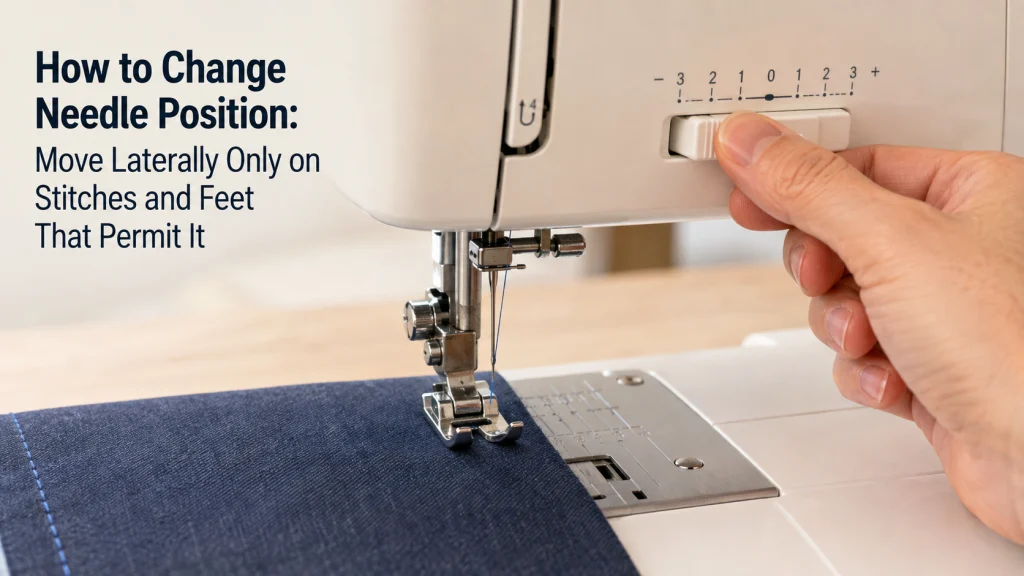
Needle position on a domestic sewing machine is a stitch setting only when the selected stitch and installed hardware permit lateral movement. Some machines use stitch-width controls to move a straight-stitch needle, while others use dedicated left/right controls or on-screen settings. The safe sequence is to confirm the stitch, identify the exact control in the machine manual, stay within that model’s allowed range, and verify clearance before sewing. If the needle will not move normally, looks physically misaligned, or contacts the presser foot or needle plate, stop treating it as a routine positioning adjustment.
Change needle position only when the stitch supports it
If you are figuring out how to change needle position, start with the selected stitch rather than the control panel. One machine may move a straight-stitch needle with stitch-width keys, another may provide a dedicated left/right shift control, and a third may lock the needle to a preset position for the stitch currently selected. Those are normal design differences, not evidence that one machine is set incorrectly.
The useful question is therefore not, “Where is the center number?” It is, “Does this stitch permit lateral movement, and which control does this exact machine use?” That same model-specific approach applies throughout basic sewing machine setup, because a label on one control does not guarantee the same behavior on another machine.
Separate lateral needle position from needle up/down stop position
Lateral needle position means moving the needle drop point left or right across the opening available for the selected stitch and hardware. Needle up/down, by contrast, controls where the needle stops vertically when sewing pauses. A machine can support both functions, only one of them, or different versions of each depending on the selected mode.
Position check: Lateral position changes where the needle enters the fabric from left to right. Needle up/down changes where the needle stops vertically when sewing pauses. One does not substitute for the other.
This distinction matters because the buttons can look related even though they solve different problems. If you want the seam line closer to an edge, you are looking for a left/right position setting. If you want the needle to remain in the fabric when you stop for a pivot, you are looking for the needle-stop function, and changing that setting will not move the stitch line sideways.
Select a stitch that permits lateral movement
Do not assume every straight-looking stitch can be shifted. Manufacturer documentation can restrict lateral movement to specific straight or stretch stitches, and some computerized machines disable left/right shift for individual stitch patterns. Brother documentation, for example, identifies straight and triple-stretch stitches on some models as adjustable while other stitch selections remain preset.
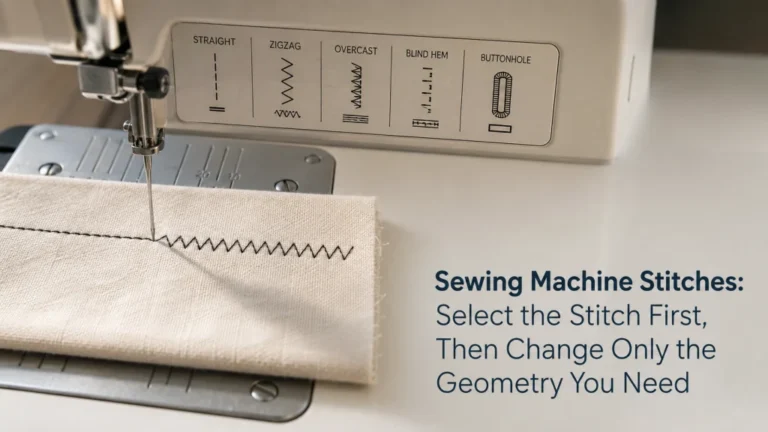
That makes stitch selection the first eligibility check. Choose the stitch required for the task, then look at the machine’s stitch chart, manual, or support page to see whether position adjustment is available for that stitch. If you need a broader explanation of what stitch selection changes, how sewing machine stitches behave provides the surrounding context without turning a positioning question into a general stitch lesson.
Identify the control your machine actually uses
There is no universal needle-position control. On some mechanical machines, a stitch-width dial changes lateral position when a compatible straight stitch is selected. On some computerized machines, the plus and minus stitch-width keys shift the needle. Other machines expose an L/R Shift setting or a dedicated position control in the screen interface.
Control check: A width dial, plus/minus width keys, an L/R Shift setting, or a dedicated position control can all be legitimate implementations. The machine manual decides which one applies.
A practical identification check is to select the documented straight stitch, raise the needle if the manual requires it, and watch the display or needle bar while changing only the specified control. If the manual calls the function L/R Shift, use that function. If it says stitch width changes straight-stitch position, treat the width control as the position control for that stitch rather than searching for a separate needle-position button.
Move left, center, or right only within the documented range
Left, center, and right are useful descriptions, but they are not universal dial values. Brother support for the ST371HD and several related models, for example, documents a specific stitch-width scale in which the right, left, and approximate center positions are represented by different numbers. Those numbers belong to the covered models and should not be copied to a different machine just because its dial also says “width.”
When you adjust needle position, use the range shown for the exact model and stitch. A computerized display may present a numeric lateral value, a graphic shift indicator, or plus/minus movement rather than named left-center-right stops. The safe endpoint is the documented limit, not the farthest position you can persuade the control to reach.

The Brother ST371HD is a mechanical sewing machine with 37 built-in stitches, including an auto-size buttonhole. It includes an automatic needle threader, a drop-in top bobbin, six sewing feet, and a free-arm configuration for everyday sewing projects. Brother also supplies a needle set, manual, and additional accessories with the machine.
Check On AmazonIf you click this link and buy, we earn a commission at no additional cost to you.
A straight-stitch width control may actually move the needle
This is one of the least intuitive parts of sewing machine needle position. On a zigzag stitch, width normally describes the side-to-side span of the stitch. On certain straight stitches, however, the same control can change the single needle drop point instead of creating a wider stitch.
For example, Brother documents machines where changing stitch width while a straight stitch is selected shifts the needle laterally, which can be used to establish a seam allowance relative to the presser-foot edge. If you want to understand the control relationship rather than just the final position, see how to adjust stitch length and width. The important point here is narrower: when the manual says width controls position for a straight stitch, that behavior is intentional.
Verify presser-foot and needle-plate clearance before sewing
A valid needle-position setting still has to clear the hardware installed on the machine. The presser foot may have a narrow opening, a side-specific channel, or another geometry that does not permit every lateral position available with a general-purpose foot. The needle plate also has to provide the correct opening for the selected stitch and position.
Where the exact machine instructions call for a manual clearance check, turn the handwheel slowly in the prescribed direction and confirm that the needle passes through the foot and plate without contact before powered sewing. Brother support specifically uses this check after certain width or position adjustments. If there is contact, do not sew and do not force the position farther; return to a permitted setting and verify that the correct foot, plate, stitch, and needle installation are in place.

This SCHMETZ set contains 10 Universal 130/705 H needles for household sewing machines. The assortment includes sizes from 70/10 through 100/16 for working across a range of common fabric weights. SCHMETZ Universal needles use a slightly rounded point and are intended for general sewing with woven and knit fabrics.
Check On AmazonIf you click this link and buy, we earn a commission at no additional cost to you.
Use seam allowance, edge stitching, and zipper placement as setup examples
Lateral position is useful because it changes where the stitch line lands relative to the fabric and foot. For a seam allowance, shifting the needle can let you keep a convenient fabric edge aligned with a reference point on the foot while moving the actual stitch line. For edge stitching, a small permitted shift can place the needle closer to a folded or finished edge without changing the overall guiding reference.
Zipper work creates another common setup reason to move the needle, but the same boundary applies: the stitch, foot attachment, and needle path must all be compatible. These examples show why position matters; they are not universal technique instructions. The correct lateral setting for one foot and machine cannot be assumed safe for another foot simply because both are described as useful near an edge or zipper.

The Dritz Seam Width Gauge is a compact acrylic measuring tool designed for quick seam allowance checks beside a sewing machine. It has edge extensions for 1/4, 3/8, 1/2, and 5/8 inch measurements, plus easy-to-see markings for light and dark fabrics. The markings are printed on the bottom of the ruler to reduce visual distortion while measuring.
Check On AmazonIf you click this link and buy, we earn a commission at no additional cost to you.
Keep full zipper and topstitching technique separate from the position setting
Changing the needle position is only one setup variable. A complete zipper installation also depends on the zipper type, fabric preparation, presser-foot attachment, sewing direction, and the relationship between the foot and zipper teeth. Topstitching likewise depends on the seam construction, edge reference, stitch length, thread, needle, and material behavior.
That is why a position setting should not be treated as a complete technique. Use lateral adjustment to put a supported stitch where it needs to land, then follow the technique appropriate to the actual construction task. Keeping those jobs separate also makes troubleshooting easier: a poor-looking seam is not automatically evidence that the needle needs to move sideways.
Stop if the needle will not move, looks misaligned, or strikes the hardware
Normal position adjustment should respond predictably when the correct stitch and control are selected. If the manual says the stitch supports lateral movement but the needle will not move, first return to the documented setup checks rather than forcing the control. Make sure the needle is raised when required, confirm the stitch selection, and verify that you are using the position control described for the exact model.
A visibly crooked needle path, repeated contact with the presser foot or plate, a hard mechanical stop, or a needle that sits incorrectly even at documented settings is no longer a routine left-center-right adjustment. Do not bend the needle bar, move internal stops, or use an extreme setting to compensate for apparent misalignment. Stop sewing and follow the model’s troubleshooting or service guidance instead.
Warning: If the needle contacts the presser foot or needle plate during the manual clearance check, do not run the machine. Verify the installed needle, foot, plate, stitch, and documented position before deciding whether the problem is setup-related or requires service.
The distinction is simple but important: a normal setting changes where an eligible stitch lands; it does not repair a machine whose needle path is physically wrong. Keeping that boundary clear prevents a setup task from turning into an unsafe attempt at internal adjustment.
Use a short check before changing position
You do not need to memorize every control layout. You do need a repeatable sequence that keeps the stitch, control, and hardware in the same decision. This checklist is especially useful when moving between a basic mechanical machine and a computerized model, because the labels may change even though the setup logic does not.
- Confirm the exact machine model and selected stitch.
- Check whether that stitch permits lateral needle movement.
- Identify the documented control: width dial, width keys, L/R Shift, or another model-specific setting.
- Move only within the range shown for that machine and stitch.
- Confirm that the installed presser foot and needle plate permit the selected position.
- Perform the manual clearance check when the machine instructions require it.
- Stop if the needle will not respond normally or contacts surrounding hardware.
This sequence also catches a common first-owner misunderstanding: the control labeled for stitch width may be exactly the control that moves a straight-stitch needle. The label makes more sense once you check what the selected stitch tells the machine to do with that control.
Final Thoughts: adjust the supported position, not a mechanical fault
Changing needle position is straightforward once you stop looking for one universal center setting. Confirm that the selected stitch supports lateral movement, use the control documented for the exact machine, stay inside its permitted range, and verify that the installed foot and plate leave a clear needle path.
If those conditions are met, moving left or right is a normal setup choice for seam placement and similar tasks. If the needle refuses to move as documented, appears physically misaligned, or hits the surrounding hardware, stop adjusting and treat the symptom as a troubleshooting or service question instead.
Frequently Asked Questions
Needle-position questions often sound simple because the desired result is just “move it left” or “put it back in the center.” The answer still depends on the exact stitch and the way that machine implements lateral movement.
Use these answers as a quick routing check, then confirm the final control and range in the model manual or manufacturer support documentation.
🪡 Can I move my sewing machine needle left or right?
Yes, if the selected stitch and machine support lateral needle movement. Check the model manual or stitch chart before changing the position, because some stitches are preset and cannot be shifted.
🎛️ Why does the stitch-width control move my needle on a straight stitch?
On some machines, the width control is reassigned to lateral needle position when a compatible straight stitch is selected. That is normal behavior when the manual documents it.
📍 What number is the center needle position?
There is no universal center number. The center value or default position depends on the machine, stitch, and control system, so use the setting documented for the exact model.
⬆️ Is needle up/down the same as changing needle position?
No. Needle up/down changes the vertical stop position when sewing pauses, while lateral needle position moves the stitch line left or right.
🦶 Why does the needle hit the presser foot after I move it?
The selected position may not be compatible with the installed foot, plate, or stitch, or another setup problem may be present. Stop sewing, return to the documented setup, and perform the manual clearance check if the machine instructions specify one.
⚙️ What if the needle will not shift even though the manual says it should?
Confirm the permitted stitch, required needle height, and correct position control first. If the machine still does not respond normally or the needle path appears misaligned, stop treating it as a routine setting change and follow the model’s troubleshooting or service guidance.
References and Sources
The position ranges and control behaviors above are model-specific, so the technical claims are anchored to manufacturer documentation rather than generalized from control labels.
- Brother needle-position support: documents stitch-width-dial control of lateral position for the listed machine models.
- Brother width-key position support: documents plus and minus stitch-width keys moving the needle right and left on supported stitches.
- Brother L/R Shift manual: documents a separate L/R Shift implementation and shows that some stitch selections do not permit that function.
- Brother needle-clearance support: documents checking the installed foot and manually verifying that the needle does not contact the foot or plate after width changes.
For a different brand or model, use its own manual or manufacturer support page for the permitted stitches, control direction, position limits, and clearance procedure.