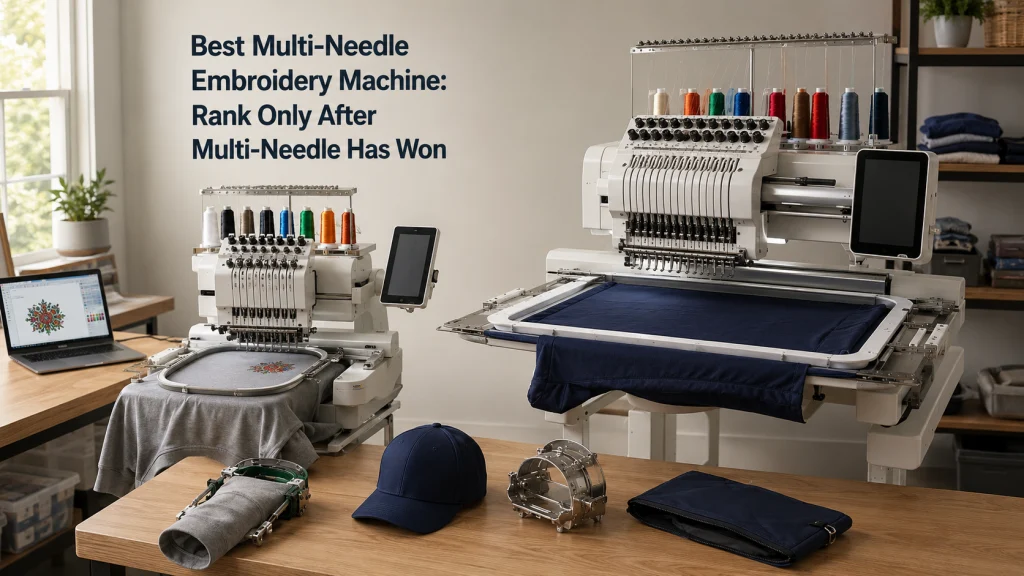
The best multi needle embroidery machine is not determined by needle count, maximum speed, or a professional label alone. Once a multi-needle system has already been justified, the useful comparison starts with the recurring items you will hoop, the embroidery field you actually need, access around sleeves and pockets, cap requirements, color sequences, design-transfer workflow, workspace, and the service route available to you. Multi-needle embroidery machines that look similar on a product page can differ enough in those areas to change which jobs they can accept comfortably. This article shows how to build a requirement-first ranking without pretending that unverified throughput, reliability, or marketing claims are proven performance.
Multi Needle Is a Family, Not One Product Tier
The best multi needle embroidery machine for one owner can be the wrong machine for another even when both buyers have already decided that multiple needles are worth paying for. Major manufacturers document systems with materially different needle counts, embroidery fields, machine weights, cap options, design-transfer methods, and support arrangements. Those differences change the work a machine can accept before speed becomes relevant. A useful ranking therefore begins by normalizing the job, not by arranging machines from smallest to largest needle count.
This distinction matters because the label covers both home-oriented and more business-oriented equipment. A compact multi needle embroidery machine for home use may suit garments, monograms, bags, and moderate color counts while still failing a buyer who needs a different cap workflow or a larger recurring field. A larger system may solve those constraints but add floor-space, stand, transport, service, and ownership demands that do not help a lighter user. The first ranking question is therefore simple: which machines pass the same work brief without asking the buyer to redesign the work around the machine?
Confirm That Multi Needle Has Already Won
This comparison starts after the architecture decision, not before it. If you are still deciding whether automatic color changes, open item access, or a multi-needle workflow justify the additional cost and space, first compare single and multi needle embroidery on the work you actually do. A single-needle machine can still be the better ownership choice when color changes are manageable, the embroidery field is sufficient, and the items hoop cleanly. Buying more needles does not automatically improve every stitch result or make every embroidery task easier.
The wider machine landscape also matters because embroidery equipment sits inside a larger set of sewing-machine systems. The overview of different sewing machine types is useful when the decision is drifting toward equipment that solves a different problem entirely. This article does not compare single-head multi-needle equipment with multi-head factory systems, and it does not teach internal repair or production-line engineering. The scope is serious home and small-maker ownership after the need for a multi-needle architecture is already established.
Write the Recurring Item and Color-Change Brief
Before comparing machines, write down the jobs that recur often enough to justify the purchase. Record the item type, typical design dimensions, usual color count, and whether the item is flat or tubular. A six-color shirt-front logo creates a different requirement from a larger jacket-back design with fewer colors. A closed tote pocket also creates a different access problem from an unassembled panel of the same size.
Separate recurring work from occasional wish-list work. If most designs use four colors, a higher needle count should not automatically outrank a machine that fits the recurring items better. A first-time buyer can easily mistake needle count for a direct measure of capability, when it is only one part of the color-change workflow. Write the requirements before reading feature pages so the comparison stays tied to actual work.
- List the three to five item types you expect to embroider most often.
- Record the largest recurring design area, not the largest design you can imagine.
- Note the typical and upper-end number of thread colors in one design.
- Mark any item that needs tubular, sleeve, pocket, bag, or cap access.
- Separate required features from features that would only be convenient.
Use that list as the filter for every later section. If a machine fails a required item or access condition, more needles or a faster published speed do not rescue it. Keep only machines that pass the brief, then compare workflow and ownership factors. This prevents the ranking from becoming a specification contest detached from the work.
Set the Required Embroidery Field Before Comparing Machines
Embroidery field should be treated as a pass-or-fail requirement for recurring designs. Manufacturer documentation shows meaningful differences among multi-needle systems, so a buyer should compare the maximum usable field against the real design dimensions that occur repeatedly. A machine that handles your common chest logos but cannot accept a recurring jacket-back layout creates rehooping, redesign, or outsourcing work that belongs in the purchase decision. The field requirement should therefore be written before you look at price or speed.
Do not confuse hoop size with guaranteed usable embroidery area, and do not assume every optional frame expands the machine to the same practical limit. Check the exact machine documentation for supported frames, orientation, and maximum design area. For example, a design that is only slightly too large for one field may still be a hard stop if splitting the design is unacceptable for placement or registration. The best comparison records the minimum field you need, the preferred field that reduces rehooping, and any specialized frame that the item requires.
Set the Required Tubular, Sleeve, Pocket, and Cap Access
Item geometry can eliminate a machine even when its flat embroidery field looks generous. Tubular arms and compatible frame systems matter when the design must reach a sleeve, pocket, bag, small garment opening, or assembled item without stitching through an unintended layer. Two machines can accept a design of the same dimensions yet differ in how easily the item can be positioned around the sewing head. That is why access belongs in the requirement ledger beside field size, not in a footnote after the shortlist is built.
Caps deserve their own pass-or-fail check because cap capability is more specific than the presence of a narrow arm. Confirm that the exact machine supports the required cap frame or driver, then check the embroidery area and the kind of cap workflow the documentation actually describes. If hats dominate the purchase, use the separate comparison of embroidery machines for hat work before accepting any general multi-needle ranking. A machine should not receive extra credit for cap language if the frame system, sewing area, or setup does not match the hats you plan to embroider.
Choose the Minimum Useful Needle Count From Recurring Color Sets
Needle count matters most when it reduces the rethreading and color-management work that actually repeats. If your common designs use a stable set of six colors, a machine that can keep those colors mounted may remove more intervention than a lower-needle system that requires frequent changes. If the designs routinely exceed the available needles, the advantage becomes smaller because some thread changes return to the workflow. The number should therefore be matched to recurring color sets rather than treated as a quality score.
Higher needle count can also change the physical and ownership package around the machine, so the extra capacity should earn its place. More needles do not prove better stitch quality, faster completed jobs, fewer thread breaks, or lower maintenance. Those outcomes depend on the machine, design, thread, stabilizer, material, settings, operator intervention, and service condition. Rank needle count only after the machine has passed field and item-access requirements, then ask whether the additional loaded colors remove enough recurring work to matter.
Compare Footprint, Stand, and Transport Reality
A multi-needle machine needs more than the rectangle measured across its casing. The operating space must account for the frame as it moves, access for threading and bobbin changes, clearance around the garment, and a stable surface or stand that supports the machine correctly. Published machine weight also matters when the machine must be moved for service or when the sewing room is shared with other equipment. A machine that technically fits a table can still be a poor workspace fit if the moving frame reaches a wall or blocks the operator.
Write the available floor or table envelope before shopping, then verify the exact machine dimensions and recommended support arrangement in manufacturer documentation. If the machine will live upstairs, move between rooms, or travel to events, transport should be treated as an ownership constraint rather than an afterthought. Do not improvise lifting or transport methods for a heavy system when the manufacturer directs owners to a dealer or specific handling procedure. Workspace compatibility is part of machine compatibility because a system that cannot be operated or serviced safely in the available space is not a practical fit.
Verify the Software and Design-Transfer Workflow
Design transfer should be checked as a complete workflow, not reduced to whether the machine has a USB port or wireless icon. Confirm the file formats the machine accepts, how designs reach the machine, what on-screen editing is available, and whether any app, network, software, or computer dependency matters to your routine. A shop that repeatedly loads customer files from a workstation has a different workflow from a home user who transfers a finished design occasionally. The best system is the one that accepts the files you actually use without adding unnecessary conversion or transfer steps.
Also separate design transfer from digitizing. Sending, resizing, rotating, positioning, or combining a design on the machine does not automatically mean the system provides full digitizing capability. If you create designs in separate software, verify that the exported format and size are supported by the exact machine before purchase. Firmware and software support can also affect connectivity features, so a feature should be counted only when the current support path for that machine is clear. A polished screen is useful only when it fits the file workflow behind it.
Verify Dealer, Training, Warranty, and Service Route
Service access deserves the same attention as embroidery field because multi-needle ownership can depend on dealer setup, training, warranty handling, parts, and qualified service. Manufacturer pages for this equipment often route buyers through authorized dealers or service networks rather than treating the machine like a small appliance that can be shipped casually. Before ranking a machine, identify who can service it, how far the service route is, what the warranty actually covers, and whether owner training is available. A cheaper machine with an unclear service path can become the more expensive ownership decision when support is needed.
Ask the dealer what is included with the machine and separate those items from optional accessories, service memberships, classes, stands, cap systems, or software. Package contents can change the real startup cost even when two machines appear close in advertised price. Used equipment adds another layer because warranty transfer, service history, firmware state, missing frames, and discontinued parts can change the comparison. If the seller cannot document the model, included hardware, service history, and current support route, mark those fields as unknown instead of filling them with assumptions.
Reject Discontinued or Unsupported Examples From a Current Ranking
Multi-needle search results often preserve older machines long after a manufacturer has replaced them. An older model can still be a reasonable used purchase, but that is a different decision from ranking equipment with an active sales and support path. Manufacturer status pages and replacement information should therefore be checked before a model is treated as a current option. A discontinued machine should not silently appear beside active equipment as though warranty, accessories, firmware, training, and parts access were identical.
For a used machine, the question changes from “is this current?” to “is this exact unit supportable enough for my ownership plan?” Confirm serial and model identification, service records when available, included frames and accessories, software or firmware requirements, and the nearest realistic service route. Do not assume that a familiar brand name guarantees indefinite parts or support for every model. Current status is not a quality score, but it is a required ownership field when the ranking is meant to guide a new purchase.
Set an Evidence Threshold for Productivity Claims
Published maximum embroidery speed is a machine specification, not a completed-order time. Real elapsed time can include hooping, loading the design, changing items, changing bobbins, trimming, responding to thread breaks, repositioning, and any operator checks required by the work. Two machines with similar headline speed can therefore produce different practical workflows, while two machines with different headline speeds may finish a small job close together. Do not convert stitches per minute directly into a profitability or production claim without a controlled comparison.
A useful test records the exact design, stitch count, number of colors, item, hoop or frame, thread and stabilizer setup, speed setting, operator interventions, and elapsed time from a defined start to finish point. Without those conditions, statements such as “twice as productive” or “production ready” are not established. Even a repeatable machine-speed test should not be stretched into a claim about completed-order economics unless loading, handling, interruptions, and operator time are measured as part of the same workflow. Productivity belongs to a measured workflow, not to the needle-count badge.
Build a Shortlist From a Verified Multi-Needle Brief
Once the requirements are written, rank machine classes by pass and fail fields before convenience features. The machine must accept the recurring item, field, access method, color workflow, workspace, file workflow, and service route. Only machines that pass those conditions should remain. This prevents a feature-rich system from outranking a simpler machine that fits the work better.
The table below is a requirement ledger, not a product recommendation list. Fill it with verified information from the exact manufacturer documentation and dealer package. Do not award points for an unverified claim or treat an unknown field as a pass. An uncertain ownership field is a reason to investigate before paying.
| Requirement | Pass condition | Evidence to check |
|---|---|---|
| Recurring embroidery field | Accepts the largest normal design without unwanted splitting | Exact maximum field and supported frame documentation |
| Item access | Accepts the required sleeve, pocket, bag, tubular item, or cap workflow | Frame, driver, arm, and compatibility documentation |
| Needle count | Covers the normal color set with an acceptable number of interventions | Needle count and your real design color sequences |
| Workspace | Fits with safe frame travel and operator access | Dimensions, weight, stand requirements, and room measurements |
| Design workflow | Accepts your files and transfer method without unnecessary conversion | Supported formats, ports, network features, and software support |
| Service route | Has a realistic path for warranty, maintenance, parts, and qualified service | Warranty terms, dealer support, service location, and model status |
After the pass-fail stage, compare convenience features such as monitoring, positioning, included frames, or thread management. Those features can improve ownership, but they should not override a failed core requirement. The ledger also makes dealer conversations more precise because each question points to a known requirement. That is how a broad market becomes a defensible shortlist.
Mark Untested Throughput and Reliability as Unknown
Manufacturer documentation can establish specifications, compatible accessories, file formats, warranty terms, and support pathways, but it does not automatically establish long-term reliability in your workload. Community reports can surface recurring owner questions, yet they rarely normalize machine condition, design density, thread, maintenance, operator skill, or service history. A positive or negative owner report is useful context, not a controlled durability study. The correct label for an untested claim is unknown.
The same rule applies to throughput. A machine may publish a high maximum embroidery speed and still spend meaningful time stopped for loading, thread management, bobbin changes, item changes, or operator intervention. Another machine may run at a lower setting but fit the item and frame workflow more cleanly. Until the same design and item are tested under defined conditions, do not rank practical output from specification sheets alone.
Route Paid-Order Economics to the Business Buying Decision
A general multi-needle ranking should stop when paid-order economics become the reason for buying. Labor time, order volume, pricing, downtime, service access, consumable use, and the cost of operator intervention can outweigh differences that look important on a feature sheet. A machine that fits a home or occasional small-maker workflow is not automatically the strongest business choice simply because it has several needles and a high published embroidery speed. Once revenue and repeat-order throughput drive the purchase, the comparison needs a different set of evidence.
Use the dedicated framework to evaluate embroidery machines for small business when those economics dominate. That decision should connect machine capability with the real order mix, labor that occurs before and after stitching, service downtime, and the consequences of a machine being unavailable. This article can establish whether a system accepts the required work, but it should not pretend that acceptance alone proves profitability. Separating equipment fit from business economics keeps both decisions clearer.
Route Cap-Dominant Buying to the Hat Workflow
Caps can also become the dominant requirement rather than one item among many. In that case, the useful comparison shifts toward cap-frame compatibility, sewing area on the cap, driver or frame system, access around the crown, and the setup required for the hats you actually plan to embroider. A machine that scores well for flat garments, bags, or general tubular work can still be a poor cap choice. The broader multi-needle ranking should not hide that specialized failure behind stronger scores elsewhere.
If hats are the recurring workload, use the separate comparison of embroidery machines for hat work before accepting a general shortlist. If neither paid-order economics nor caps dominate, return to the broader embroidery machine selection framework and compare the remaining multi-needle candidates against the full ownership brief. The goal remains the same: keep only systems that pass the work they must actually accept. Specialized requirements should control the decision when they are genuinely specialized, not be averaged away.
Final Thoughts: Rank Multi-Needle Systems on the Work They Must Actually Accept
The strongest multi-needle choice is the machine that passes the recurring work brief with the fewest important compromises. Start with field and item access, then check color workflow, workspace, file transfer, support, and model status. Needle count and published speed matter only after those requirements are satisfied. A machine that fails a recurring cap, sleeve, pocket, field, or service need should not stay near the top because its specification sheet looks impressive.
Keep untested reliability and throughput marked as unknown, and require exact documentation for compatibility, accessories, warranty, and support. If paid-order economics or hats dominate, move to the comparison built around that workload. The goal is a shortlist you can defend with the item, design dimensions, service route, and required frame all verified. That is more useful than any single number on the machine.
FAQs
These questions focus on checks that can change a multi-needle purchase after the architecture decision is settled. The answers stay tied to field, item access, color workflow, support, and ownership conditions. Exact compatibility still has to be verified for the machine and accessory combination. Marketing labels alone do not establish fit or capability.
Use the FAQ as a final screen, not as a substitute for the exact manual and support documentation. If an answer exposes a failed requirement, return to the ledger before comparing convenience features. An unresolved field should remain unresolved until it is verified. The goal is to remove uncertainty before purchase rather than after a difficult item reaches the frame.
🧵 How many needles do I actually need on a multi-needle embroidery machine?
Match needle count to the color sets that recur in your designs. More needles can reduce rethreading, but they do not by themselves prove better stitch quality, higher completed-job output, or a better fit for your items.
📐 How large should the embroidery field be?
Use the largest design size you expect to repeat regularly, then verify the exact machine’s usable field and compatible frames. Buying for an occasional oversized idea can add cost and footprint without improving normal work.
🧢 Does a tubular arm mean the machine is good for hats?
No. Verify the exact cap frame or driver, supported embroidery area, and cap workflow for the machine because tubular access alone does not prove that the system fits the hats you plan to embroider.
⚙️ Can I rank machines by maximum stitches per minute?
No. Maximum embroidery speed is a specification, while completed-job time also depends on hooping, item changes, thread and bobbin events, design conditions, speed settings, and operator interventions.
References and Sources
Manufacturer documentation is necessary here because needle count, field, frame capability, transfer methods, weight, warranty, support, and model status vary by exact machine. Those facts should not be inferred from appearance or retailer summaries. The sources below directly support the equipment distinctions used in the article. They are included only because these claims require model-specific evidence.
These sources are not endorsements and do not prove reliability, real throughput, or a universal winner. Manufacturer performance language is separate from directly checkable specifications. Community discussion informed buyer questions only, not technical capability. Exact manuals and dealer terms still control the machine being considered.
- Brother multi-needle specifications: verifies six-needle architecture, field, frames, cap capability, connectivity, and warranty information.
- Brother professional embroidery lineup: supports model-status checking across active and discontinued equipment.
- Janome seven-needle documentation: verifies seven-needle architecture, field, file formats, transfer method, footprint, and weight.
- Baby Lock multi-needle specifications: verifies ten-needle architecture, field, hoops, file formats, weight, frames, and support structure.
- BERNINA multi-needle documentation: verifies a sixteen-needle class with a different professional-oriented configuration.
Together, the documents show why needle count or speed alone cannot support a fair ranking. Field, item access, workflow, physical requirements, and support can differ before any productivity test begins. The method therefore uses pass-fail requirements first and marks unsupported performance claims as unknown. Apply the same evidence standard when adding another machine or accessory to the shortlist.