A beginner sewing machine should be chosen around the work you expect to do in the first year, not around the lowest price or longest stitch list. Start with a small project set, check the controls and support those projects need, then record the first likely limitation of each finalist. A simple machine can be a strong long-term fit, while a feature-rich machine can still be a poor first purchase when its controls, instructions, accessories, or future task fit are unclear. Buy only when you can explain what the machine needs to do now and what would eventually make you replace or supplement it.
Define beginner as a first independent domestic-machine buyer
A beginner sewing machine is not a separate technical class of machine. Here, a beginner is an adult choosing a domestic machine for independent use, with limited experience judging controls, stitch functions, accessory fit, material handling, instructions, and service needs. That distinction matters because a machine can be marketed as simple while still being a poor match for the projects the owner actually wants to sew.
The first decision is therefore not mechanical versus computerized, cheap versus expensive, or basic versus advanced. It is whether you can describe a realistic first-year workload. If that brief is still vague, use the broader process for how to choose a sewing machine before building a purchase shortlist.
Write the first-year project set before comparing machines
Start with work you can actually name. Hemming trousers, repairing a split seam, making a stable woven tote, sewing a simple garment, piecing cotton, and installing a zipper create a much more useful brief than saying you want a machine that can “do everything.” Those projects expose the utility stitches, buttonhole needs, feed control, free-arm access, presser-foot requirements, and material changes that matter first.
Do not build the list around a dream project that may never become regular work. A future denim hem is worth noting, but it should not automatically dominate a machine that will spend most of its time on lightweight woven fabric. The same logic prevents a first-time buyer from drifting into specialist systems before a normal domestic machine has even been ruled out.
| First-year project | Function to verify | What would expose a limitation |
|---|---|---|
| Basic alterations and mending | Reliable straight stitch, zigzag, reverse, useful free-arm access | Restricted access around cuffs, narrow hems, or bulky seam crossings |
| Simple woven garments | Usable stitch length and width control, buttonhole method, zipper-foot compatibility | Repeated buttonholes or more demanding fabric handling |
| Light craft and bag projects | Feed behavior through changing layer stacks, compatible feet, suitable needle range | Frequent dense intersections or materials outside the machine’s stated use |
| Introductory quilting | Stable feeding, workspace, compatible quilting feet where needed | Larger projects that expose workspace or feed-control limits |
This worksheet is deliberately short. If one row turns into a completely different machine system or a specialized production need, separate that decision instead of forcing one first machine to cover every possible future direction.

The Brother XR3774 has 37 built-in stitches and a one-step buttonhole. It includes a wide table and eight sewing feet, including walking and quilting feet. Its free arm and dial-based controls support everyday garment sewing, mending, and introductory quilting projects.
Check On AmazonIf you click this link and buy, we earn a commission at no additional cost to you.
List the utility functions those projects require
For most first domestic-machine projects, a small group of functions matters more than a long decorative stitch menu. Straight stitch, zigzag, reverse, usable stitch length control, a buttonhole method when garments are planned, and access to the correct presser feet usually affect the work more directly. The exact list depends on your material, construction method, and projects.
Thread tension belongs on that control check too. Look at how the exact manual explains normal upper-thread tension, what the control changes, and which symptoms should send you back to threading or bobbin setup before you adjust anything. That matters because incorrect threading can imitate a tension problem, so a clearly marked dial is useful only when the instructions explain when to leave it alone and when an adjustment is appropriate.
A common first-owner misunderstanding is to treat more built-in stitches as more sewing capacity. Stitch count does not prove feed quality, thick-seam behavior, buttonhole consistency, durability, or compatibility with a foot you may need later. When comparing the best sewing machines for different needs, read the function list as evidence of available controls, not as a score.
Separate easy control from reduced capability
“Easy” should describe something observable: a clearly marked control, a documented threading route, a speed limiter, a readable stitch selection process, a useful error message, or instructions that a new owner can follow. It should not mean that the machine has fewer parts, fewer stitches, or a lower price. A basic interface can be clear, but so can a well-designed computerized interface.
Independent beginner testing is useful when the exact test conditions are stated. Current tested roundups have measured setup and threading time, examined manuals, and asked new users to complete basic sewing tasks, which is stronger evidence than a product page calling a machine beginner-friendly. Even then, the result applies to the tested model and task, not to every machine with the same control type.
Direct mechanical controls
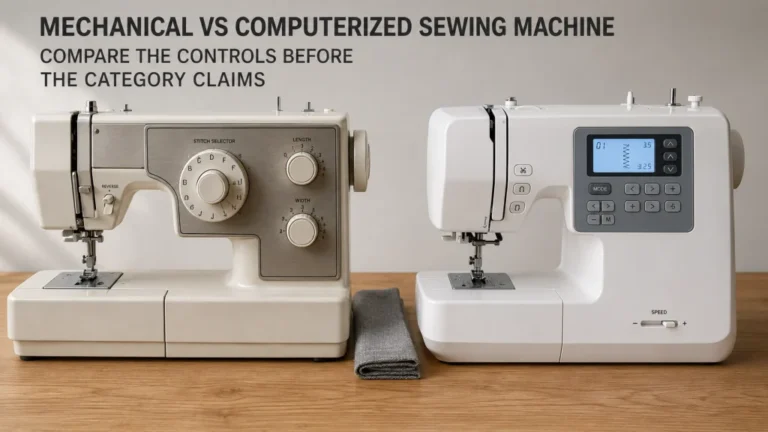
Dials and levers can make the relationship between a setting and the stitch easy to see. The tradeoff is that the operator may need to choose stitch length, width, or other settings manually rather than accepting a preset. For a learner who wants to understand the machine directly, that can be useful rather than burdensome. Check the actual control labels and manual instead of assuming every mechanical machine behaves the same way.
Computerized presets and speed limiting
A computerized machine may select default stitch settings when a stitch is chosen, and some machines provide a separate maximum-speed control. Those features can reduce the number of decisions made during the first few sessions, but they do not guarantee that the interface will feel clear to a particular user. Verify how stitch selection, speed limiting, start and stop controls, and error messages work on the exact candidate.
Threading, bobbin, and error information
Threading and bobbin instructions deserve more weight than they often receive in a feature comparison. Manufacturer instructions show that bobbin winding, bobbin insertion, upper threading, and even handwheel direction can vary in ways that matter to normal operation. A first owner needs instructions for the exact machine, not a generic video that merely looks similar. If the machine displays error information, check whether the manual actually explains those messages and the owner-level response.

The Brother XM2701 uses dial-based stitch selection and manual thread tension for direct control over common settings. It has 27 built-in stitches, a one-step buttonhole, six included feet, and a free arm. An automatic needle threader and Quick-Set top drop-in bobbin simplify routine setup while keeping the interface straightforward.
Check On AmazonIf you click this link and buy, we earn a commission at no additional cost to you.
Judge learning support from the exact manual and support route
The manual is part of the machine. Before buying, make sure the exact manual is available and inspect the sections for threading, bobbin winding and insertion, needle replacement, presser-foot changes, stitch selection, buttonholes, cleaning, troubleshooting, and owner maintenance. Clear diagrams and model-specific steps can keep a normal setup mistake from looking like a machine fault.
Also check what happens after the manual stops being enough. Look for an official support route, current parts and accessory information, and realistic access to service if the machine develops a fault beyond owner-level work. A low purchase price is less attractive when the instructions are weak and no practical support path exists.
Note: Current independent testing has found meaningful differences in how quickly first-time users can set up machines and how useful the supplied instructions are. Treat that as model-specific evidence, not proof that one control family is always easier.
The useful question is simple: if threading, bobbin installation, or a basic control stops making sense, can the exact manual get you back to sewing without guesswork?
Check the complete in-box setup without assuming accessories
Product photos often show a machine surrounded by accessories, but the package contents are what matter. Check the current US listing or manual for the exact items included, then compare those items with the first-year project set. Do not assume a zipper foot, buttonhole foot, extra bobbins, needles, spool caps, extension table, hard cover, or other accessory is included because a similar machine bundles it.
Compatibility matters when something is missing. A presser foot with the right generic name can still use the wrong holder, shank, attachment method, or machine-specific interface. Check the machine manual or compatibility list before counting an optional part as an easy future upgrade.
- Exact power cord and foot controller arrangement required by the machine
- Correct bobbin type and any bobbins actually included
- Needles supplied, plus the needle system required for replacement
- Presser feet needed for the first-year project set
- Spool caps, tools, and cleaning items named in the package list
- Full manual or a confirmed official route to the full manual
This checklist is not a demand for a large bundle. It is a way to keep a missing essential from turning a seemingly inexpensive first sewing machine into a confusing first afternoon.
Evaluate growth by capability, not stitch count
“Room to grow” only becomes useful when growth has a name. It might mean sewing more buttonholes, working with knits, handling larger quilts, crossing thicker seam intersections, using a particular compatible foot, or wanting more control over speed and needle position. A machine grows with you only while those later tasks remain inside its real operating and interface limits.
This is why there is no universal best beginner sewing machine based on specifications alone. A machine with dozens of decorative stitches can still hit an early limit if the future project needs more workspace or a control the machine does not provide. Another machine with a shorter stitch menu may remain useful for years if your work stays inside its strengths.
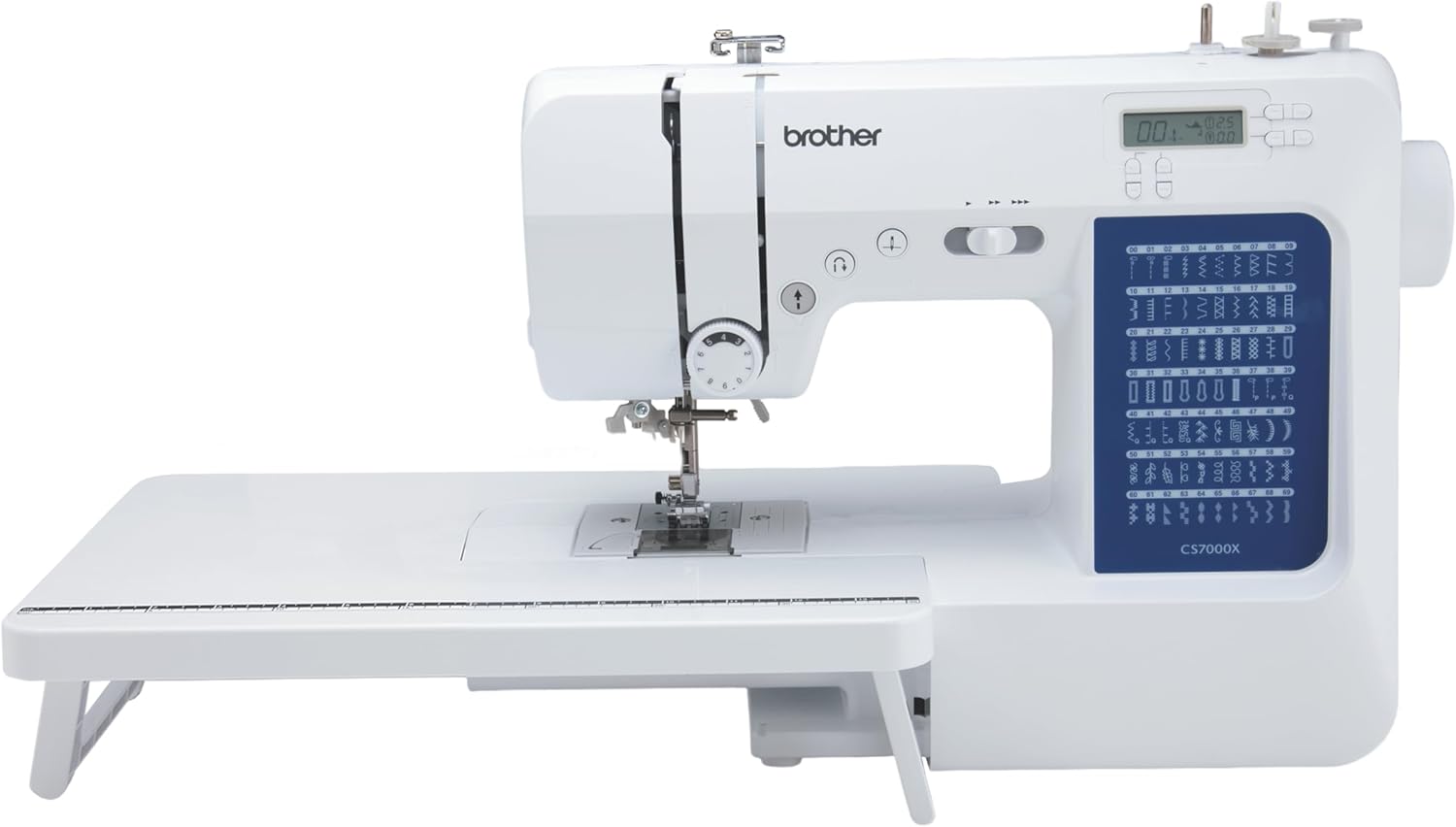
The Brother CS7000X combines an LCD interface and adjustable sewing speed with 70 built-in stitches and seven one-step buttonhole styles. It includes a wide table, 10 sewing feet, and a quilt guide for projects that need additional workspace or specialized feet. A free arm and automatic needle threader support common garment and setup tasks as sewing skills expand.
Check On AmazonIf you click this link and buy, we earn a commission at no additional cost to you.
Set the evidence bar for a beginner recommendation
A beginner claim should survive a basic audit. Official material can establish controls, stitch options, included items, dimensions, compatibility, warranty terms, and support routes. Independent testing can add observed setup difficulty or stitch results when the exact model, fabric, tasks, and method are disclosed. Community discussions show what first-time buyers worry about, not technical performance.
Marketing labels deserve the least weight. “Beginner,” “heavy duty,” “easy,” or “advanced” can help describe positioning, but none of those words proves that the machine will handle your layer stack, produce better stitches, remain repairable, or fit a future accessory. The claim should point back to something you can check on the exact candidate.
| Claim | Evidence worth using | Evidence that is not enough |
|---|---|---|
| Easy to learn | Clear manual, observable controls, named novice test with disclosed tasks | Retailer adjective or star rating alone |
| Handles planned material | Documented machine guidance or an independent test with the material and setup stated | “Heavy duty” wording, price, or frame material alone |
| Accessory will fit | Exact compatibility list, manual, or manufacturer part information | Matching appearance or generic accessory name |
| Room to grow | Named future task matched to a checked function or operating range | Large stitch count with no future task attached |
The audit keeps the recommendation tied to evidence rather than reputation. It also makes it easier to explain why two new sewists can reasonably choose different first machines.
Build a current shortlist by beginner situation
A useful shortlist stays short when each candidate answers a different version of the first-year brief. Models, bundles, prices, and availability change, so match current machines to the three situations below instead of treating one product as the default. For each finalist, note the exact model, why it fits, and its first likely limitation.
Remove any candidate that cannot be tied to a real project, control need, handling constraint, or support advantage. Every remaining option should have a distinct job.
Simplicity-first learner
If you want controls that make immediate visual sense, favor clearly labeled utility settings backed by a manual that uses the same terms. Direct dials and levers can work well, but their presence alone does not prove clarity. Check threading, bobbin insertion, stitch selection, reverse, buttonholes, and tension guidance on the exact model. Record the first future task that would require a missing control, more workspace, or another attachment system.
Learner who values speed limiting and guided controls
If controlling pace is a priority, look for a clearly explained maximum-speed control that does not make basic operation harder to understand. Presets can reduce early decisions, but you still need to know what the machine selected and how to change it. Read the error-message and stitch-selection sections instead of assuming a screen makes learning easier. The first limit may appear when presets, workspace, accessory fit, or material handling no longer match your work.
Learner who needs repeated storage or class transport
If the machine comes off a shelf for every session or travels to classes, size and weight become part of normal ownership. Check published dimensions and weight, then consider how the carrying arrangement, power accessories, and cover fit your routine. Do not trade away required functions merely to make the machine easier to lift. The first limit is often reduced workspace or a missing function that becomes noticeable as projects grow.
| Beginner situation | What should earn a place on the shortlist | First limit to write down |
|---|---|---|
| Simplicity first | Clear controls, usable manual, straightforward threading and bobbin instructions | First missing control, workspace need, or attachment requirement |
| Guided pace and controls | Understandable speed limiting, presets, stitch selection, and error information | First task restricted by presets, space, accessory fit, or material handling |
| Frequent storage or transport | Manageable size and weight without losing required first-year functions | First project where reduced workspace or omitted function becomes inconvenient |
This keeps the shortlist actionable without naming a product that may change or disappear. Before purchase, recheck the exact machine page, manual, package contents, compatibility information, and support route.

The Brother HC1850 is a 10.1-pound computerized sewing and quilting machine with a built-in carrying handle. It includes variable speed control, an LCD screen, a wide table, and eight sewing feet. Its portable design combines class-friendly transport with features for garment sewing, quilting, and general home sewing projects.
Check On AmazonIf you click this link and buy, we earn a commission at no additional cost to you.
Explain each finalist’s first likely limitation
Every finalist should have a sentence that begins, in effect, “I would reconsider this machine when…” The answer might be when larger quilting work needs more room, when garment sewing requires a control not present, when repeated thick intersections exceed the documented use, or when a needed accessory cannot be verified as compatible. That is more informative than promising that a beginner will never outgrow the machine.
The first limit is not necessarily a defect. It is the point where the current machine stops matching your work. When that boundary is named before purchase, a later upgrade becomes a response to a real repeated limitation rather than an emotional reaction to a new feature list.
State when borrowing, classes, or no purchase is the better first step
Buying is not automatically the next move. Borrowing a sound domestic machine or taking a class can help when you cannot yet tell whether garments, quilting, alterations, or craft projects will dominate. A short period of supervised use can also reveal whether direct dials, guided controls, a speed limiter, machine weight, or workspace actually affects comfort and progress.
Waiting is reasonable when the only brief is “I want to learn sewing someday,” or when the available budget only buys a machine whose instructions, condition, or support cannot be checked confidently. A delayed purchase can be cheaper than replacing a poorly matched machine after the first few projects.
| Choose this path | When it makes sense | What you should learn before buying |
|---|---|---|
| Buy | You can name the first-year projects and verify a current candidate against them | Its controls, included essentials, support route, compatibility, and first likely limit |
| Borrow | You need real machine time before knowing which functions matter | Which controls and project types you actually use |
| Take a class | You want guided exposure to setup, sewing, and more than one machine style | Which interface and physical handling make independent use easier |
| Wait | The project brief, budget, machine condition, or support route is still unclear | Enough information to build a defensible shortlist |
The decision card keeps “buy nothing yet” on the table. That is useful when uncertainty is the real problem rather than lack of features.
Route child or teen buying to the kids guide
This article is for an adult choosing a first independently operated domestic machine. A child or teen purchase changes the decision because supervision, instruction, physical control, maturity, and household safety boundaries become part of the brief. A machine that suits an adult novice should not be presented as child-safe merely because it has simple controls.
Use the dedicated kids-machine decision process for that situation rather than borrowing conclusions from this page. The operator has changed, so the evidence and buying criteria need to change with them.
Route a proven later limitation to the intermediate guide
A later-machine decision starts after you can identify a repeated limitation in real work. That might be workspace, feed control, buttonhole demands, repeated material stacks, speed control, a specific accessory interface, or another function that the current machine cannot reasonably provide. Wanting a more expensive machine by itself is not the same thing.
Keep a short log of the projects where the limitation appears. If the same boundary repeatedly interrupts useful work, the next-machine decision can start from evidence instead of from a generalized fear of outgrowing the first machine.
Final Thoughts: Choose the first machine for work you can name
The strongest first purchase is neither the cheapest machine nor the one with the most visible features. It is the domestic machine whose controls, included essentials, compatibility, learning support, and practical limits line up with a first-year project set you can describe. That is a stronger basis for choosing a first sewing machine.
Before paying, write down the first likely limitation of the finalist. If you cannot explain what would eventually make you need something different, the shortlist probably still depends too heavily on marketing language. And if you still cannot name the work you expect to do, borrowing, taking a class, or waiting remains a valid decision.
Safety and service: Follow the exact machine manual for setup, cleaning, oiling, replacement, and troubleshooting. Stop using the machine and move to qualified service for damaged cords, overheating, smoke, burning odor, sparks, exposed wiring, uncontrolled motion, a hard mechanical lock, repeated hard needle strikes, or any work the manual reserves for service personnel.
The aim is to separate normal beginner learning from a poor machine match and give you a clear reason for every finalist.
Frequently Asked Questions
Beginner questions often sound simple but hide different project, control, compatibility, and support needs. The short answers below keep those variables visible instead of turning them into universal rules.
If a question depends on an exact machine, use the model number and manual as the final check. Generic product labels and visually similar parts are not substitutes for model-specific evidence.
🧵 What actually makes the best sewing machine for beginners?
The best fit is a machine whose controls, instructions, included essentials, compatibility, and first likely limitation match your first-year projects. A high stitch count or a “beginner” label does not prove that fit.
⚙️ Is a mechanical sewing machine always easier for a beginner?
No. Direct mechanical controls can be clear, while computerized presets and speed limiting can reduce some setup decisions. Compare the exact interface and manual rather than treating the control family as a shortcut for ease.
🪡 How many stitches does a sewing machine for beginners need?
There is no useful universal number. Start with the stitches required by the planned projects, usually including straight stitch and zigzag, then add functions such as buttonholes only when the project set needs them.
🦶 Can I assume I can add different presser feet later?
No. Verify the exact machine, holder or shank arrangement, attachment method, and manufacturer compatibility information. Two feet with the same generic name can still require different interfaces.
🚦 How do I know when I have outgrown my first machine?
Look for a repeated project limitation, not boredom with the feature list. A real upgrade trigger is a recurring need for workspace, feed behavior, control, or compatible accessories that your current machine cannot provide.
These answers are intentionally bounded to first independent domestic-machine ownership. Setup tutorials, specialist machines, child supervision, fixed budget tiers, used-machine evaluation, and fault diagnosis need their own decision process.
References and Sources
These sources support beginner testing, model-specific setup and control instructions, and real first-machine questions. Community discussions show buyer uncertainty, not performance.
Availability, bundles, manuals, warranty terms, and support can change, so recheck US manufacturer information before buying.
- Better Homes & Gardens beginner machine testing: documents testing across setup, manuals, basic stitches, features, and value, including model-specific differences in setup and instructions.
- The Spruce beginner machine testing: describes novice testing, common beginner functions, sewing-speed context, and differences between mechanical and computerized controls.
- Brother upper-threading support: shows why threading steps must be checked against the machine instructions.
- Brother bobbin-winding support: documents a model-specific bobbin-winding sequence and related operating cautions.
- Brother thread-tension support: shows how upper-thread tension symptoms can overlap with incorrect threading and why adjustment should follow the model instructions.
- Singer manuals and machine updates: provides the manufacturer’s current route for machine manuals and model documentation.
- SewingForBeginners first-machine discussion: illustrates the recurring buyer tension between current beginner needs, future projects, features, and fear of outgrowing a machine.
- SewingForBeginners beginner-machine questions: documents how new sewists commonly ask for both ease of learning and room to grow, while community answers vary widely.
These sources support the decision method rather than a universal ranking. Recheck the machine, manual, package, compatibility, warranty, and support route on publication day.